<?xml version="1.0" encoding="utf-8"?><feed xmlns="http://www.w3.org/2005/Atom" ><generator uri="https://jekyllrb.com/" version="4.4.1">Jekyll</generator><link href="https://unmb.pw/blog/feed.xml" rel="self" type="application/atom+xml" /><link href="https://unmb.pw/blog/" rel="alternate" type="text/html" /><updated>2026-05-15T15:47:32-04:00</updated><id>https://unmb.pw/blog/feed.xml</id><title type="html">unmanbearpig</title><subtitle>Blog on computery things</subtitle><entry><title type="html">HostelPunk — ranking hostels by atmosphere instead of by 8.9</title><link href="https://unmb.pw/blog/project/2026/05/15/hostelpunk.html" rel="alternate" type="text/html" title="HostelPunk — ranking hostels by atmosphere instead of by 8.9" /><published>2026-05-15T08:00:00-04:00</published><updated>2026-05-15T08:00:00-04:00</updated><id>https://unmb.pw/blog/project/2026/05/15/hostelpunk</id><content type="html" xml:base="https://unmb.pw/blog/project/2026/05/15/hostelpunk.html"><![CDATA[<h1 id="hostelpunk--ranking-hostels-by-atmosphere-instead-of-by-89">HostelPunk — ranking hostels by atmosphere instead of by 8.9</h1>

<p>I made a hostel search site: <a href="https://hostelpunk.com/">https://hostelpunk.com/</a>.</p>

<p>The short version is that I kept ending up in clean, central, 9.1-star hostels where nobody talked to each other. That is fine if you came to sleep. It is not fine if you came to meet people. A generic 8.9 cannot tell those two places apart, because everything good on a hostel platform compresses into a tight band between roughly 8.5 and 9.6, and the thing I actually want to know about — whether the common room is alive — is buried in subscores and review text.</p>

<p>So the main HostelPunk score is not a rating in the normal sense. It is one specific question:</p>

<div class="language-text highlighter-rouge"><div class="highlight"><pre class="highlight"><code>PerfAtmPct = perfect-atmosphere reviews / atmosphere reviews
</code></pre></div></div>

<p>If a hostel has <code class="language-plaintext highlighter-rouge">PerfAtmPct 93</code>, that means 93% of reviewers gave the atmosphere the top-of-scale rating in the source review data. It is not cleanliness, not luxury, not a weighted soup of staff and breakfast and WiFi. It is a deliberately narrow social-vibe statistic, and it is cruel to places that are pleasant but not socially exceptional. That is the point.</p>

<p>A top-box rate behaves differently from an average. An average is forgiving; everyone giving 8/10 looks healthy. A top-box rate asks “did this place actually work for people, or was it just fine?” For solo-traveler hostels, “fine” is the failure mode I’m trying to detect.</p>

<h2 id="sample-size-or-100-from-7-reviews-is-not-100">Sample size, or: 100 from 7 reviews is not 100</h2>

<p>The obvious bug: a 100% score from 7 reviewers should not casually outrank a 93% from 900. HostelPunk handles this in two places. The displayed score is the raw <code class="language-plaintext highlighter-rouge">PerfAtmPct</code>, because that’s the number a human can interpret. A confidence tier sits next to it. Ranking uses a Wilson-style lower-bound adjustment so small-n hostels can appear without pretending to be deep signal.</p>

<p>Current confidence tiers:</p>

<ul>
  <li><code class="language-plaintext highlighter-rouge">certain</code>: 300+ reviews</li>
  <li><code class="language-plaintext highlighter-rouge">confident</code>: 100+</li>
  <li><code class="language-plaintext highlighter-rouge">mid</code>: 50+</li>
  <li><code class="language-plaintext highlighter-rouge">low</code>: 20+</li>
  <li><code class="language-plaintext highlighter-rouge">blind</code>: below 20</li>
</ul>

<p>Absence-of-warning claims (e.g. “no bed bug reports”) require at least 100 analyzed reviews. Below that, “we don’t know” is the honest read, not “clean.”</p>

<h2 id="bed-bugs-are-a-different-axis">Bed bugs are a different axis</h2>

<p>The most useful thing the site does is refuse to compress everything into one score.</p>

<p>A hostel can be social and have recent bed bug reports. Averaging those two facts into a 7.9 is worse than useless — they drive different decisions. Some people will never book a place with any positive bed bug evidence. Others will tolerate one historical report against hundreds of clean recent reviews. The job is to show both, with dates and severity, and let the user pick.</p>

<p>As of today the bed bug detector has positive evidence for 1,075 properties: 4,839 total reports, 658 in the last twelve months, 81 in the last thirty days. The product copy says “reports” and “evidence,” not infestation. Bites can be misidentified, reviews lag conditions, hostels remediate. UI tiers care about recency and repetition — one old report is not the same object as multiple reports this month.</p>

<p>Two concrete Amsterdam examples:</p>

<ul>
  <li><strong>Onefam Amstel</strong> — <code class="language-plaintext highlighter-rouge">PerfAtmPct 93/100</code>, 916 reviews, <code class="language-plaintext highlighter-rouge">certain</code> confidence, #1 in Amsterdam, #1 in the Netherlands. Dorms from $79, privates from $253. Top languages English 59%, Spanish 8%, Turkish 7%. Clean example, no warnings.</li>
  <li><strong>Princess Hostel Leidse Square</strong> — <code class="language-plaintext highlighter-rouge">PerfAtmPct 2/100</code> from 499 reviews, 59 bed bug reports, 18 in the last twelve months, latest 2026-05-02. High tier. The extreme version of the page doing its job.</li>
</ul>

<h2 id="suspicious-reviews-as-a-distribution-problem">Suspicious reviews as a distribution problem</h2>

<p>The other detector is weirder, and it’s where the project drifts from travel site into applied statistics hobby.</p>

<p>Explicit paid-review complaints are rare. Sometimes a reviewer writes that staff offered a free drink for a positive review; that’s easy to catch but doesn’t move the ranking much. The interesting signal is aggregate: too many short top-rated reviews compared with what peer properties produce. The detector estimates excess short top-atmosphere reviews against a leave-one-out baseline. That estimate is not a per-review verdict. It’s a property-level shape anomaly large enough that I don’t want the raw atmosphere score to be the only score.</p>

<p>When the warning threshold is met, HostelPunk also computes an <em>adjusted</em> atmosphere score with the likely distorted reviews excluded, and shows both. Today, 53 current properties cross that line with an adjusted score below the raw score. Average drop: 3.9 points. Largest drop: 16.4 points.</p>

<p>Examples:</p>

<ul>
  <li>Mama Hostel &amp; Rooftop Pool, Hanoi — raw 70.4, adjusted 54.0, estimated 90 incentivized.</li>
  <li>ClinkNOORD, Amsterdam — 3,015 reviews, <code class="language-plaintext highlighter-rouge">PerfAtmPct 53/100</code>, also 7 bed bug reports and a suspicious-5-star warning with about 104 possibly bought. The mixed-signal case: well-known place, large sample, weak vibe, two separate warning kinds — the page can show all of that at once instead of melting it into a single number that picks a side.</li>
</ul>

<p>The wording in this section of the UI is intentionally less fun than the rest of the brand. An aggregate anomaly is not a claim that review #12345 is fake, and the copy has to keep that clear.</p>

<h2 id="the-unglamorous-half-source-data-is-weird">The unglamorous half: source data is weird</h2>

<p>The funniest bugs are not in the ranking code. They’re in source data.</p>

<p>Two real Hostelworld quirks the scraper has to handle:</p>

<ul>
  <li>Review notes from the legacy review endpoint sometimes come back exactly 512 characters long, cut mid-word. The public Hostelworld site shows the same cutoff, so the truncation is at the source, not in our parser.</li>
  <li>The city availability endpoint can return room prices like <code class="language-plaintext highlighter-rouge">999999.99</code>. If you request a different currency, the sentinel is numerically <em>converted</em> and comes back as something like <code class="language-plaintext highlighter-rouge">1170756.99 USD</code> — still bogus, now wearing a currency label.</li>
</ul>

<p>So a lot of the engineering is not “fetch JSON, insert rows.” It’s deciding which fields are trustworthy enough to display, what counts as sentinel garbage, and which narrower endpoint should override a broader one. None of that ends up in product copy, but it’s why prices on the page don’t lie.</p>

<h2 id="stack">Stack</h2>

<p>The boring-in-a-good-way part:</p>

<ul>
  <li>Go for the user-facing app (<code class="language-plaintext highlighter-rouge">hostelpunk</code>)</li>
  <li>PostgreSQL + PostGIS</li>
  <li>Server-rendered HTML, a little HTMX</li>
  <li>No npm</li>
  <li>Python scrapers with <code class="language-plaintext highlighter-rouge">uv</code></li>
  <li>Review analysis runs as a separate worker pool against models served locally and via OpenRouter</li>
</ul>

<p>HostelPunk is the public surface of a bigger pile called SocialSpots, which has Hostelworld, Booking.com, Google Maps, iOverlander, OSM, and Workaway data behind it. The order-of-magnitude shape: roughly a million-ish Hostelworld reviews, tens of millions of Booking reviews, and tens of millions of review-analysis rows feeding the detectors. A traveler does not need to see any of that. They need to see that a hostel’s 93 came from 916 reviews, that there are no current warnings, and that the language mix probably fits them.</p>

<h2 id="still-rough">Still rough</h2>

<p>The UI isn’t done. Some detectors are conservative, some are still mining signals. Rare-class precision is hard. Source platforms change APIs. A property can improve or decay faster than the crawler notices. The right posture is not “the model knows the truth” — it’s “this is a much better prior than reading 300 random reviews at 1am the night before a flight.”</p>

<p>It already works well enough for me. If I’m choosing between two hostels in Amsterdam or Hanoi or Hoi An, I’d rather start from atmosphere hit-rate, confidence, warning evidence, suspicious-review adjustment, language mix, and source links than from a generic 8.9.</p>

<p><a href="https://hostelpunk.com/">https://hostelpunk.com/</a></p>]]></content><author><name></name></author><category term="project" /><summary type="html"><![CDATA[Ranking hostels by atmosphere hit-rate, confidence, bed bug evidence, and suspicious-review signals instead of generic 8.9 scores.]]></summary></entry><entry xml:lang="ru"><title type="html">Как читать гистограмму в Curves: экспозиция по объекту, а не по фонарям</title><link href="https://unmb.pw/blog/misc/2026/04/13/photo-exposure-histogram-curves-ru.html" rel="alternate" type="text/html" title="Как читать гистограмму в Curves: экспозиция по объекту, а не по фонарям" /><published>2026-04-13T08:00:00-04:00</published><updated>2026-04-13T08:00:00-04:00</updated><id>https://unmb.pw/blog/misc/2026/04/13/photo-exposure-histogram-curves-ru</id><content type="html" xml:base="https://unmb.pw/blog/misc/2026/04/13/photo-exposure-histogram-curves-ru.html"><![CDATA[<p>Гистограмма становится полезной только тогда, когда её читают вместе с самим изображением — потому что в отрыве от картинки это просто форма, которая может означать что угодно.</p>

<p>В инструменте Curves горизонтальная ось — это яркость: чёрный слева, белый справа. Вертикальная ось показывает, сколько пикселей приходится на каждый уровень яркости. Но форма графика сама по себе мало что даёт — нужно понимать, какие области кадра её формируют и стоит ли в этих областях что-то сохранять.</p>

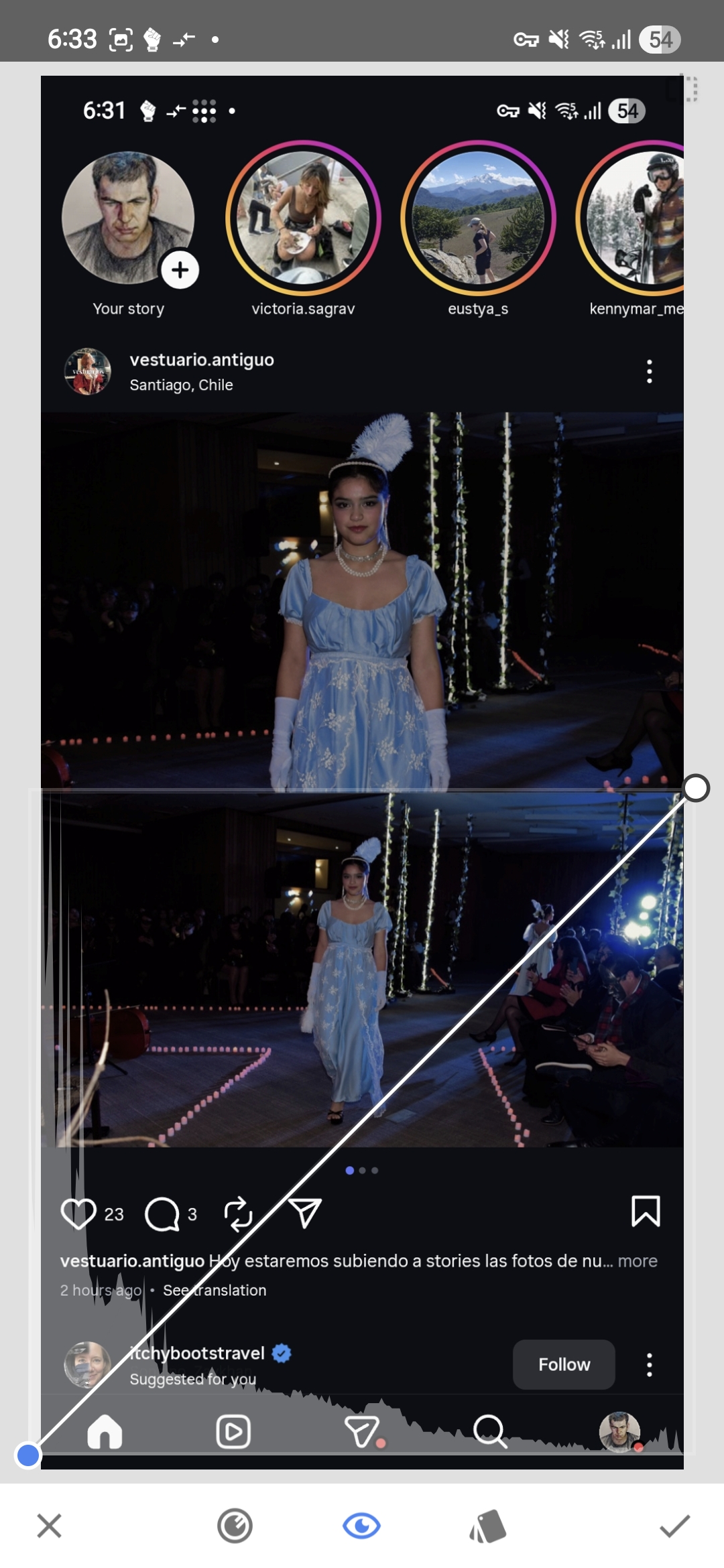
<p>В этом конкретном примере фотография явно тёмная, гистограмма сильно сдвинута влево. Справа тоже есть какие-то данные, но само по себе наличие ярких пикселей ничего не говорит о том, принадлежат ли они объекту съёмки или чему-то совершенно постороннему — отражению, сценическому прожектору, бьющему в объектив, гирлянде светодиодов на заднем плане.</p>

<h2 id="первая-гистограмма">Первая гистограмма</h2>

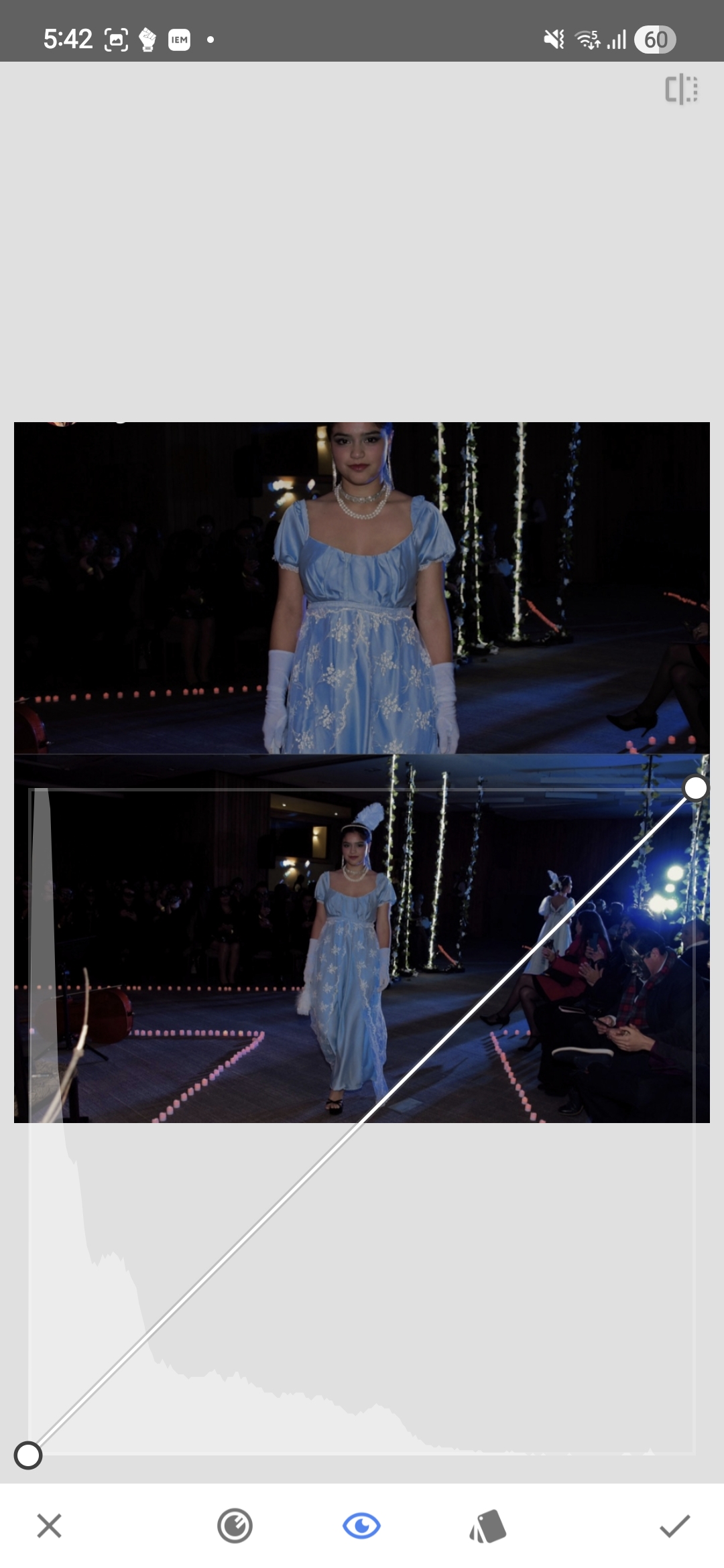
<p>На первом скриншоте большая часть изображения лежит в тёмной части тонального диапазона, и хотя справа на гистограмме видны несколько ярких пикселей, к модели они не имеют отношения.</p>

<p><a href="/blog_assets/photo_exposure_curves_initial.jpg"><img src="/blog_assets/photo_exposure_curves_initial.jpg" alt="Начальный скриншот кривых" /></a></p>

<p>Этот кластер данных в светах — сценическое освещение, попавшее в объектив. Да, на гистограмме справа что-то есть, но к модели это не относится. Сама модель сидит слишком далеко слева — изображение недоэкспонировано ещё до какой-либо коррекции.</p>

<h2 id="обрезаем-вводящие-в-заблуждение-света">Обрезаем вводящие в заблуждение света</h2>

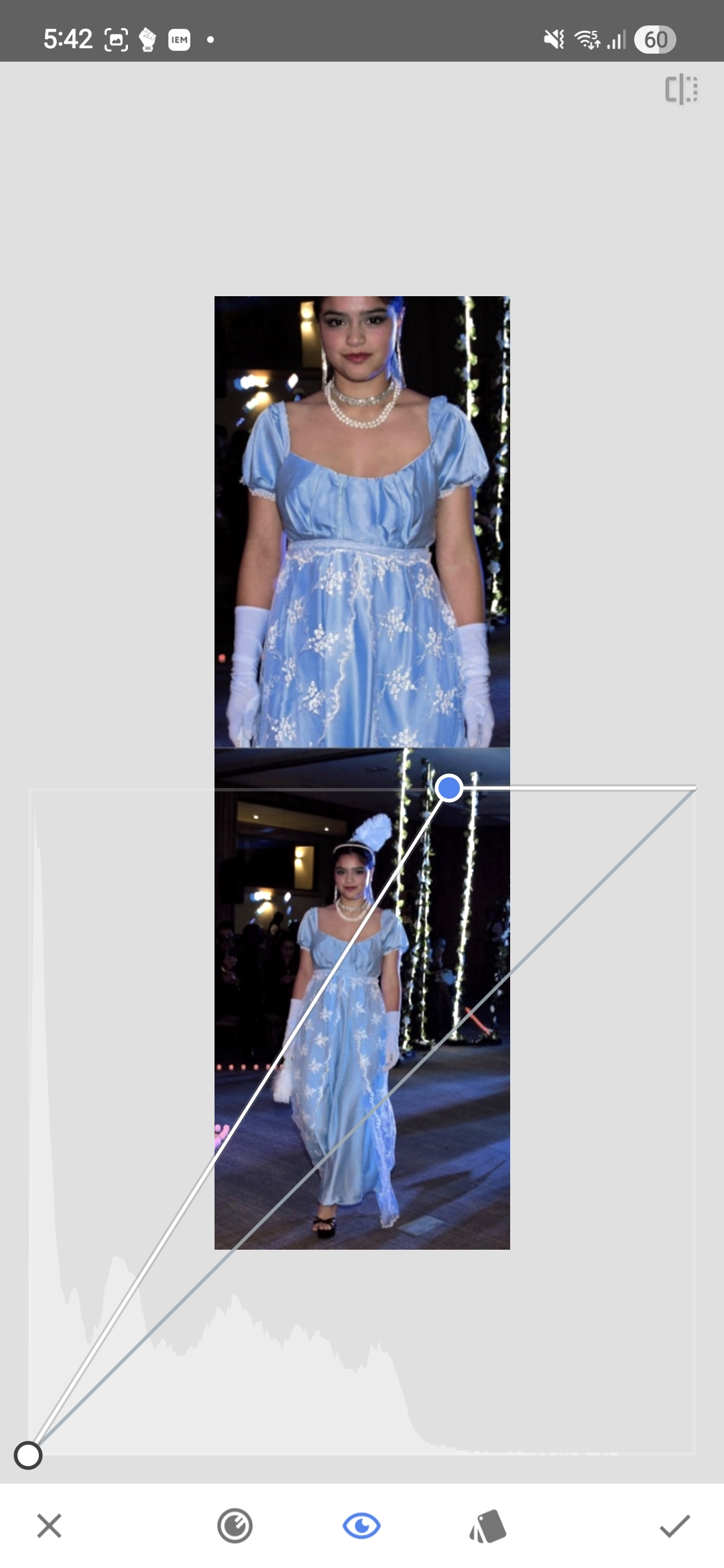
<p>На следующем скриншоте яркие источники света обрезаны из кадра.</p>

<p><a href="/blog_assets/photo_exposure_curves_cropped.jpg"><img src="/blog_assets/photo_exposure_curves_cropped.jpg" alt="Обрезанная версия с кривыми" /></a></p>

<p>Без источников света гистограмму читать проще: ярких пикселей стало ещё меньше, и сразу видно, что почти все тона лежат в тёмной и средней частях диапазона. Модель просто не дотягивает до достаточно ярких значений, чтобы нормально отображаться на экране.</p>

<p>Нескольких сценических светодиодов хватает, чтобы на гистограмме появились света, а объект при этом остаётся тёмным.</p>

<h2 id="инструмент">Инструмент</h2>

<p>На скриншотах в этой статье используется <a href="https://play.google.com/store/apps/details?id=com.niksoftware.snapseed&amp;hl=en-US">Snapseed</a> — бесплатное приложение для редактирования фотографий, доступное на <a href="https://play.google.com/store/apps/details?id=com.niksoftware.snapseed&amp;hl=en-US">Android</a> и <a href="https://apps.apple.com/us/app/snapseed-photo-editor/id439438619">iOS</a>. Однако та же логика работает в большинстве фоторедакторов — почти все включают либо инструмент Curves, либо более простую Levels-коррекцию, которая делает то же самое. Интерфейсы и названия отличаются, но принцип читать гистограмму в контексте реального изображения остаётся одинаковым независимо от того, какой инструмент вы используете.</p>

<h2 id="сдвиг-белой-точки">Сдвиг белой точки</h2>

<p>Сама коррекция простая: белая точка в Curves сдвигается влево, примерно туда, где гистограмма начинает резко подниматься.</p>

<p>Светлые тона объекта перераспределяются по более широкой части доступного диапазона, и изображение раскрывается очень быстро — новых деталей не появляется, просто те тона, что уже были, теперь эффективнее используют выходной диапазон.</p>

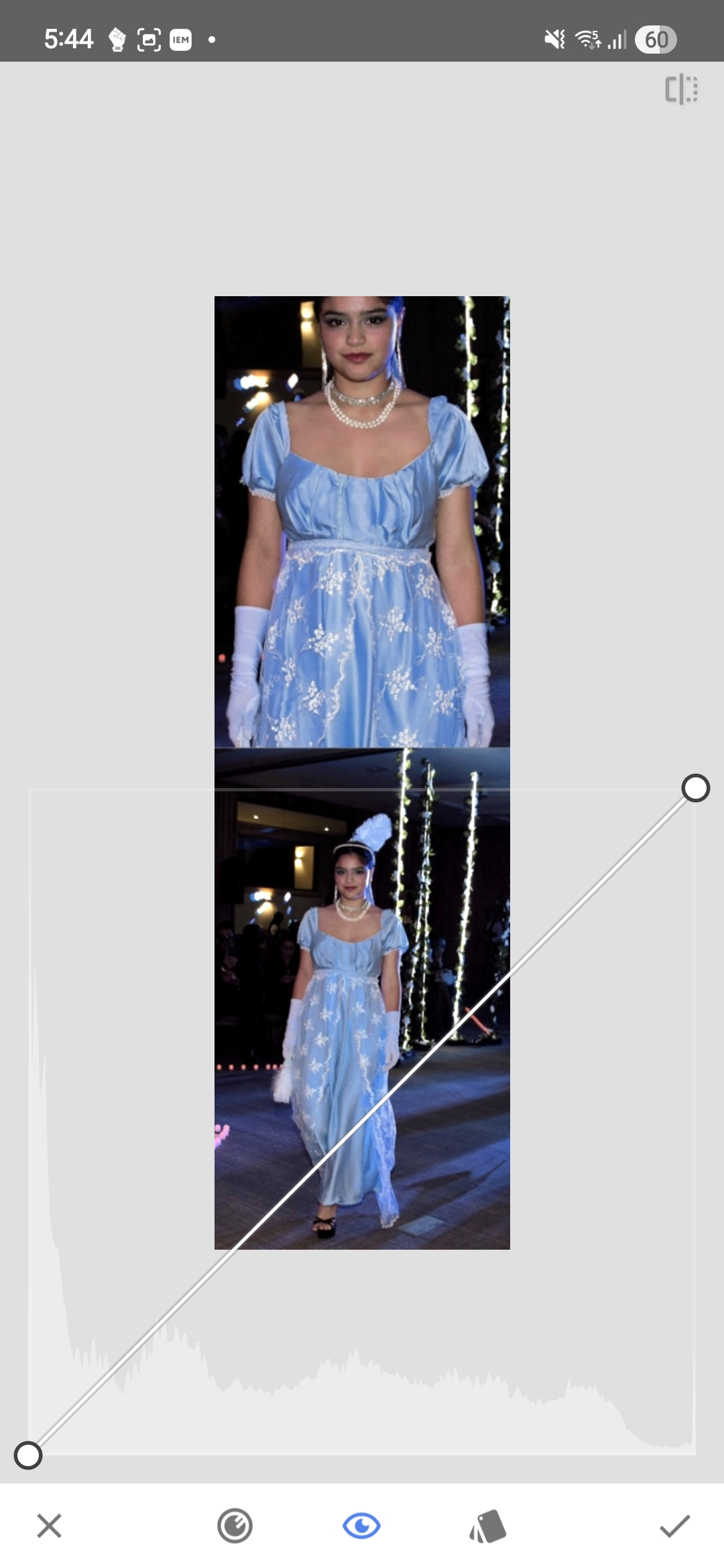
<p>После применения коррекции и повторного открытия Curves гистограмма выглядит заметно иначе.</p>

<p><a href="/blog_assets/photo_exposure_curves_after_adjustment.jpg"><img src="/blog_assets/photo_exposure_curves_after_adjustment.jpg" alt="Гистограмма после первой коррекции кривых" /></a></p>

<p>Тона теперь занимают гораздо большую часть гистограммы. До правого края она не доходит — и не нужно: запас по светам это нормально, загонять их в клиппинг ради красивого графика смысла нет.</p>

<h2 id="изоляция-самых-ярких-пикселей">Изоляция самых ярких пикселей</h2>

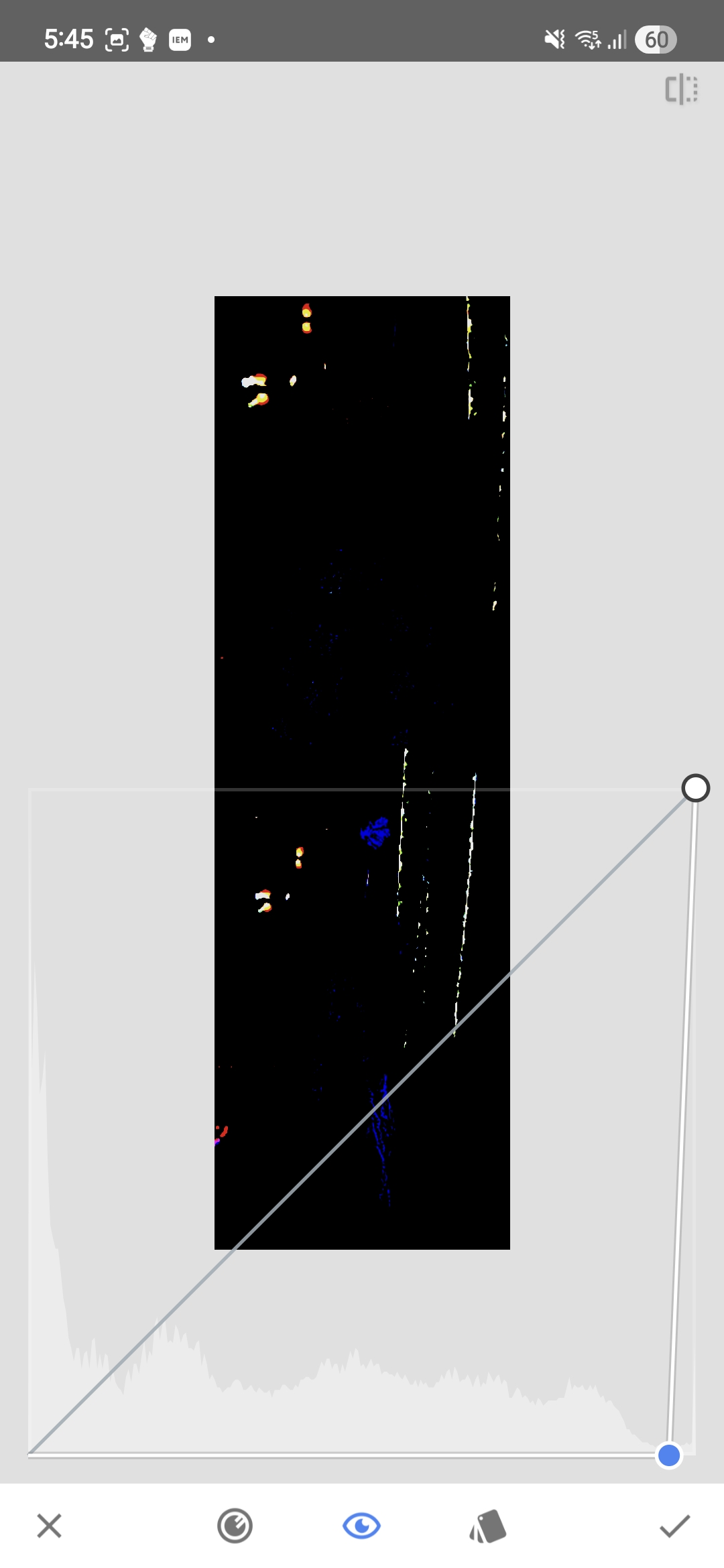
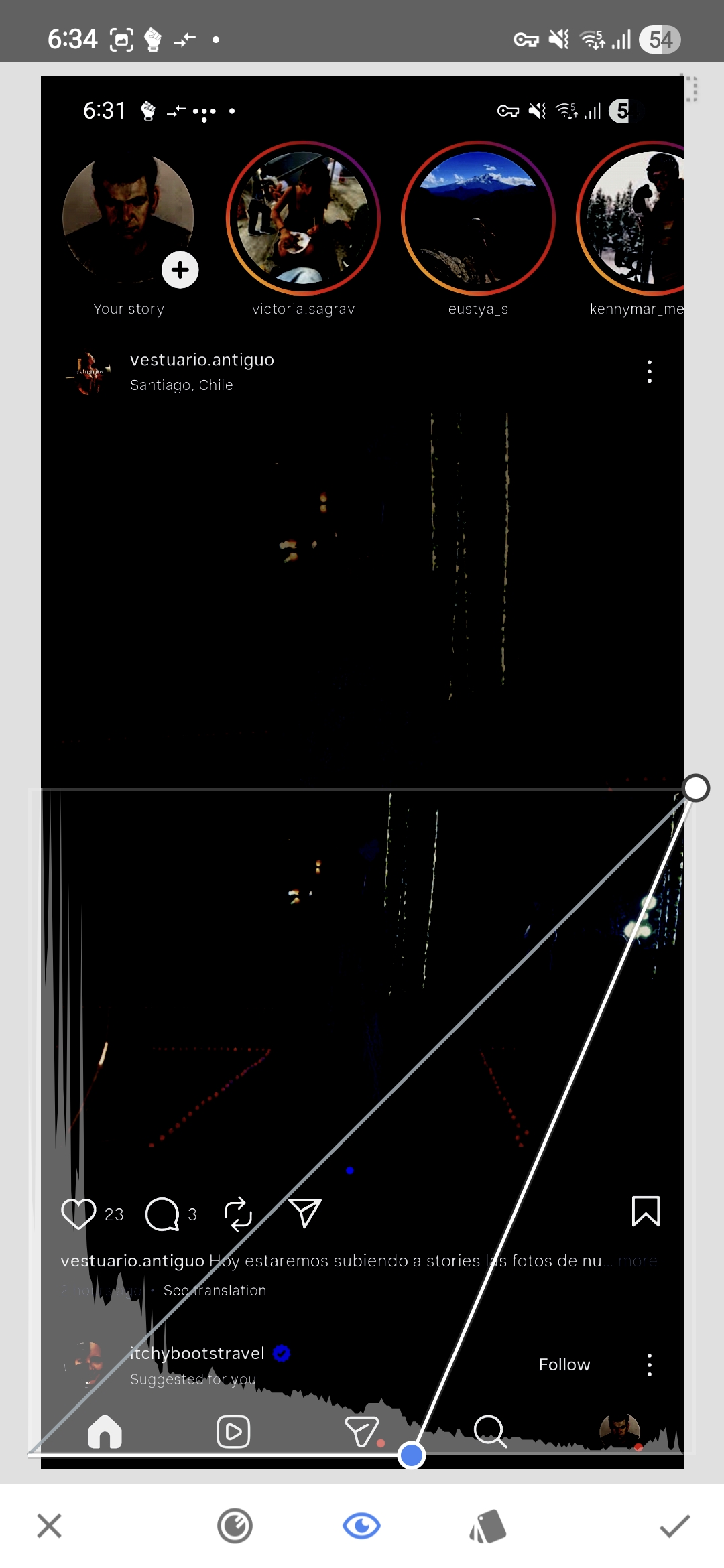
<p>Один практический способ проверить, что на самом деле содержат самые яркие части изображения — это сдвинуть чёрную точку в Curves до упора вправо. Это давит почти всё в чёрный и оставляет видимыми только самые яркие пиксели.</p>

<p><a href="/blog_assets/photo_exposure_brightest_pixels.jpg"><img src="/blog_assets/photo_exposure_brightest_pixels.jpg" alt="Изолированы только самые яркие пиксели" /></a></p>

<p>Ожидаемо: осталось сценическое освещение, светодиоды и мелкие яркие элементы, к модели отношения не имеющие. На самой модели в этом диапазоне яркости пикселей почти нет — пара изолированных точек в синем канале, не больше.</p>

<p>Самые яркие значения в исходном кадре — это осветительная установка и артефакты сцены, а не кожа или лицо.</p>

<h2 id="почему-это-важно-на-экране-телефона">Почему это важно на экране телефона</h2>

<p>На телефоне фотография существует внутри интерфейса — белый текст, иконки, кнопки, другие фотографии. Все эти элементы используют тот же экран и тот же диапазон яркости.</p>

<p>Если объект сжат в тёмную половину диапазона без причины, фотография будет выглядеть заметно темнее интерфейса и соседних фотографий в ленте. Можно получить изображение, в котором технически ничего не обрезано, но которое выглядит неоправданно тусклым там, где его реально будут смотреть.</p>

<p>Каждое изображение до чисто белых светов доводить не нужно. Но тона объекта съёмки не должны сидеть внизу шкалы только потому, что пара ярких пятен занимает правый край гистограммы.</p>

<h2 id="та-же-логика-внутри-instagram">Та же логика внутри Instagram</h2>

<p>Для Instagram стоит смотреть на изображение в том окружении, где его увидят.</p>

<p>Первый скриншот — экран Instagram как есть: фотография, UI, текст, иконки, лента, плюс наложенная гистограмма Curves.</p>

<p><a href="/blog_assets/photo_exposure_ig_full.jpg"><img src="/blog_assets/photo_exposure_ig_full.jpg" alt="Скриншот Instagram с гистограммой" /></a></p>

<p>Следующий скриншот изолирует только яркие пиксели, сдвигая чёрную точку вправо до тех пор, пока всё ниже выбранного порога не станет чёрным.</p>

<p><a href="/blog_assets/photo_exposure_ig_bright_only.jpg"><img src="/blog_assets/photo_exposure_ig_bright_only.jpg" alt="Только яркие пиксели в Instagram" /></a></p>

<p>Обратите внимание, что осталось видимым. На этом пороге большая часть интерфейса Instagram по-прежнему на месте — текст, иконки, фотографии других пользователей. Элементы платформы занимают те значения яркости, до которых наша фотография едва дотягивается.</p>

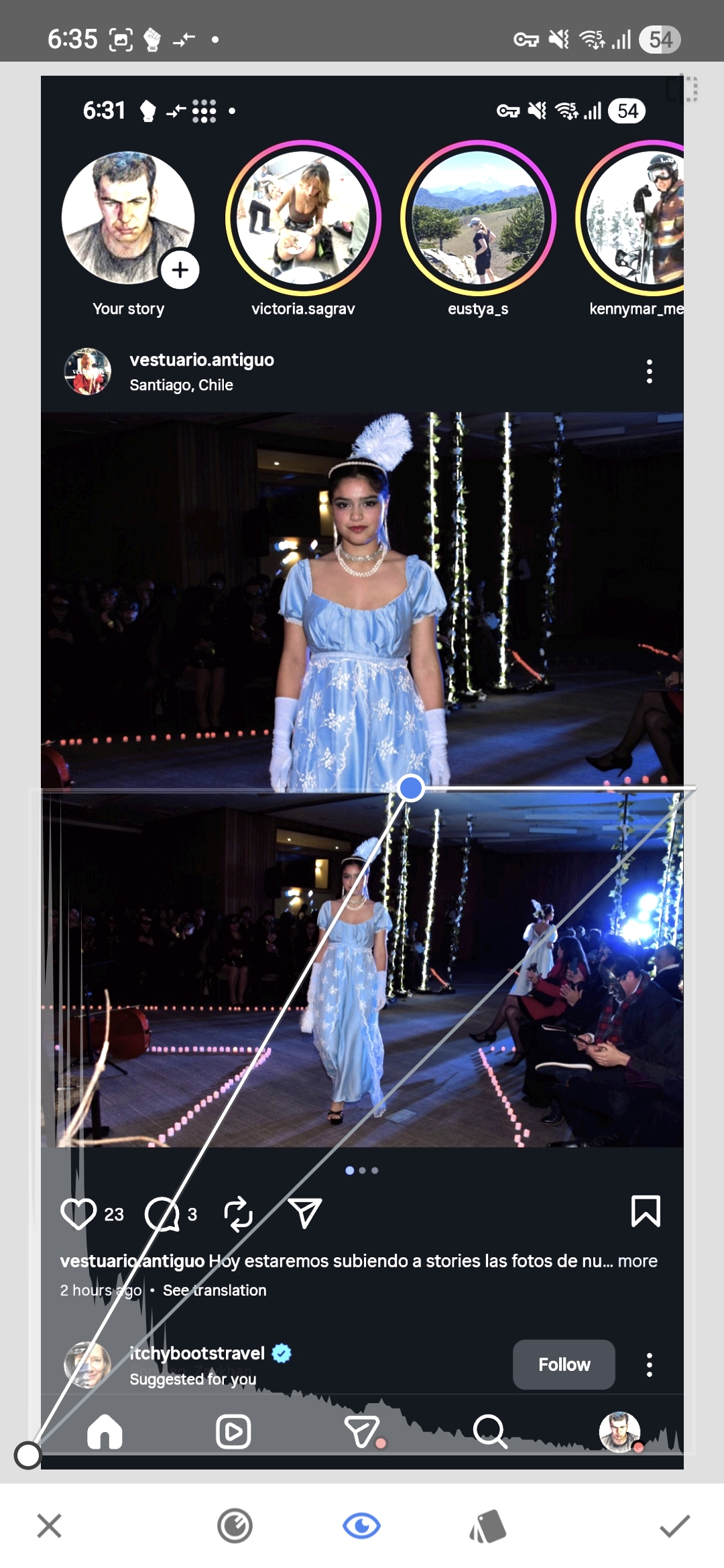
<p>На следующем скриншоте белая точка сдвинута на ту же позицию.</p>

<p><a href="/blog_assets/photo_exposure_ig_corrected.jpg"><img src="/blog_assets/photo_exposure_ig_corrected.jpg" alt="Белая точка сдвинута до порога в Instagram" /></a></p>

<p>Модель теперь экспонирована так, что корректно читается внутри интерфейса Instagram. Элементы UI слегка переэкспонированы, но они и не часть нашего изображения — внутри самой фотографии ничего не потеряно.</p>

<p>Слайдер пришлось сдвинуть почти до середины экрана. Это большая коррекция, и она показывает, сколько динамического диапазона в исходной обработке оставалось пустым — объект был заметно темнее, чем нужно, и сам по себе, и относительно окружения в ленте.</p>

<p>Важно, расположены ли тона объекта съёмки достаточно высоко в диапазоне, чтобы нормально читаться там, где фотографию реально будут смотреть. Если нет — белую точку обычно можно сдвинуть гораздо дальше, чем кажется, пока клиппинг не затрагивает то, что в кадре важно.</p>]]></content><author><name></name></author><category term="misc" /><summary type="html"><![CDATA[Как читать гистограмму в контексте реального изображения, и почему несколько ярких пикселей от сценических прожекторов не означают, что экспозиция выставлена правильно.]]></summary></entry><entry xml:lang="en"><title type="html">Reading a Histogram in Curves: Brightening the Subject Instead of Trusting the Lights</title><link href="https://unmb.pw/blog/misc/2026/04/13/photo-exposure-histogram-curves.html" rel="alternate" type="text/html" title="Reading a Histogram in Curves: Brightening the Subject Instead of Trusting the Lights" /><published>2026-04-13T08:00:00-04:00</published><updated>2026-04-13T08:00:00-04:00</updated><id>https://unmb.pw/blog/misc/2026/04/13/photo-exposure-histogram-curves</id><content type="html" xml:base="https://unmb.pw/blog/misc/2026/04/13/photo-exposure-histogram-curves.html"><![CDATA[<p>A histogram becomes useful only when it is read together with the image itself, because in isolation it is just a shape that could mean almost anything.</p>

<p>In the Curves tool the horizontal axis represents brightness — black on the left, white on the right — and the vertical axis shows how many pixels fall at each brightness level. That much is straightforward, but the part that actually matters is understanding which regions of the frame are responsible for the shape you see in front of you, and whether those regions contain anything worth preserving.</p>

<p>In this particular example the photo is clearly dark and the histogram is stacked heavily toward the left side. There is some data on the right as well, but the presence of bright pixels alone does not tell you whether those pixels belong to the subject or to something else entirely — a reflection, a stage light aimed into the lens, a string of LEDs in the background.</p>

<h2 id="the-first-histogram">The first histogram</h2>

<p>In the first screenshot most of the image lives in the darker part of the tonal range, and while there are a few bright pixels visible on the right side of the histogram, they do not belong to the model.</p>

<p><a href="/blog_assets/photo_exposure_curves_initial.jpg"><img src="/blog_assets/photo_exposure_curves_initial.jpg" alt="Initial curves screenshot" /></a></p>

<p>That small cluster of highlight data comes primarily from the stage lighting shining into the lens. The histogram does contain information on the right side, but it is not information that carries any meaningful detail about the subject — the model herself is sitting too far to the left, which is why the image reads as underexposed before any correction has been applied.</p>

<h2 id="cropping-out-the-misleading-highlights">Cropping out the misleading highlights</h2>

<p>In the next screenshot the bright lights have been cropped out of the frame.</p>

<p><a href="/blog_assets/photo_exposure_curves_cropped.jpg"><img src="/blog_assets/photo_exposure_curves_cropped.jpg" alt="Cropped version with curves" /></a></p>

<p>Once the lights are removed from the visible area, the histogram becomes considerably easier to interpret: there are even fewer bright pixels now, and it shows much more clearly where the meaningful tonal information of the image actually sits. Nearly all of it belongs to the darker and middle parts of the range, and the model is simply not reaching far enough into the brighter values to render well on screen.</p>

<p>This is precisely why reading the full histogram without paying attention to what produces its shape can be misleading — a handful of stage LEDs are enough to suggest that the image already contains strong highlights, while the actual subject remains too dark.</p>

<h2 id="about-the-tool">About the tool</h2>

<p>The screenshots in this article show <a href="https://play.google.com/store/apps/details?id=com.niksoftware.snapseed&amp;hl=en-US">Snapseed</a>, a free photo editing app available on <a href="https://play.google.com/store/apps/details?id=com.niksoftware.snapseed&amp;hl=en-US">Android</a> and <a href="https://apps.apple.com/us/app/snapseed-photo-editor/id439438619">iOS</a>. However, the same logic applies to nearly all photo editing apps — most of them include either a Curves tool or a simpler Levels adjustment that accomplishes the same thing. The specific interface and names may vary, but the fundamental principle of reading the histogram in context with the actual image remains the same regardless of which tool you use.</p>

<h2 id="moving-the-white-point">Moving the white point</h2>

<p>The correction itself is straightforward: the white point in Curves is moved to the left, roughly to the position where the histogram begins rising sharply.</p>

<p>This remaps the brighter tones of the subject across a wider portion of the available range, and the image opens up very quickly — not because new detail has appeared, but because the tones that were already present are now distributed more effectively across the output values.</p>

<p>After applying the adjustment and reopening Curves, the histogram looks noticeably different.</p>

<p><a href="/blog_assets/photo_exposure_curves_after_adjustment.jpg"><img src="/blog_assets/photo_exposure_curves_after_adjustment.jpg" alt="Histogram after the first curves adjustment" /></a></p>

<p>The tonal information now covers much more of the histogram. It still does not extend all the way to the extreme right, and there is no particular reason it should — some headroom is normal, and driving important highlights into clipping just to fill the graph to the edge accomplishes nothing useful.</p>

<h2 id="isolating-the-brightest-pixels">Isolating the brightest pixels</h2>

<p>One practical way to verify what the brightest parts of the image actually contain is to move the black point all the way to the right in Curves. This crushes nearly everything to black and leaves only the very brightest pixels visible.</p>

<p><a href="/blog_assets/photo_exposure_brightest_pixels.jpg"><img src="/blog_assets/photo_exposure_brightest_pixels.jpg" alt="Only the brightest pixels isolated" /></a></p>

<p>The result is not surprising: what remains visible is stage lighting, LEDs, and other small bright elements that have very little to do with the model. On the subject herself there are hardly any pixels in that extreme brightness range, aside from a few isolated blue-channel specks scattered here and there.</p>

<p>This confirms the earlier reading — the brightest values in the original frame were not carrying important skin or facial detail, they belonged almost entirely to the lighting setup and the surrounding artifacts in the scene.</p>

<h2 id="why-this-matters-on-a-phone-screen">Why this matters on a phone screen</h2>

<p>When a photo is displayed on a phone it does not appear in isolation — it sits inside an interface full of white text, icons, buttons, and other photos, all of which use the same screen and the same available brightness range.</p>

<p>If the subject is compressed into the darker half of the tonal range without good reason, the photo will appear noticeably darker than the surrounding interface elements and often darker than other photos nearby in the feed. This is not a hypothetical concern: it is entirely possible to produce an image that is technically not clipped anywhere and still looks unnecessarily dim in the context where it will actually be viewed.</p>

<p>This does not mean every image needs to be pushed to pure white highlights. It means that the useful tones of the subject should not be left sitting too far down the scale simply because a few irrelevant bright spots happen to occupy the far-right edge of the histogram.</p>

<h2 id="the-same-logic-inside-instagram">The same logic inside Instagram</h2>

<p>For photos intended for Instagram it is worth looking at the image not as an isolated file but in the environment where it will actually be displayed.</p>

<p>The first screenshot in this sequence shows the Instagram screen as it normally appears — the photo, the UI, text, icons, and the surrounding feed content all visible together, with a Curves histogram overlay.</p>

<p><a href="/blog_assets/photo_exposure_ig_full.jpg"><img src="/blog_assets/photo_exposure_ig_full.jpg" alt="Instagram screenshot with histogram" /></a></p>

<p>The next screenshot isolates only the brighter pixels by moving the black point to the right until everything below a chosen threshold turns black.</p>

<p><a href="/blog_assets/photo_exposure_ig_bright_only.jpg"><img src="/blog_assets/photo_exposure_ig_bright_only.jpg" alt="Instagram bright pixels only" /></a></p>

<p>What matters here is not just which parts of the screen disappear, but which parts remain. At that threshold most of the Instagram UI is still visible — the text, the icons, other users’ photos. In other words, the platform elements and the surrounding content are occupying brightness values that the photo in question is barely reaching.</p>

<p>In the next screenshot, instead of using the black point to inspect the threshold, the white point is moved to that same position.</p>

<p><a href="/blog_assets/photo_exposure_ig_corrected.jpg"><img src="/blog_assets/photo_exposure_ig_corrected.jpg" alt="Instagram white point moved to threshold" /></a></p>

<p>The model is now exposed at a level that reads correctly inside the Instagram interface. The UI elements and some of the surrounding content appear slightly overexposed, but that is expected because they are not part of our image — within the photo itself no important information is lost.</p>

<p>This also serves as a practical measure of how much of the available dynamic range had been left unused. The slider had to be moved almost to the middle of the screen, which is a very large correction and which shows that the original edit was leaving the subject considerably darker than necessary, both in absolute terms and relative to the environment where the photo would be viewed.</p>

<p>The practical question is therefore not whether the file technically contains highlight data somewhere in the frame. The question is whether the tones that fall on the subject are placed high enough in the range to display clearly in the context where the image will actually be seen. If they are not, then the white point can usually be moved much further than one might expect, as long as clipping is avoided in the parts of the image that carry meaningful detail.</p>]]></content><author><name></name></author><category term="misc" /><summary type="html"><![CDATA[How to read a histogram in the context of the actual image, and why a few bright pixels from stage lights do not mean the exposure is correct.]]></summary></entry><entry><title type="html">listenomics - Last.fm charts</title><link href="https://unmb.pw/blog/project/2026/02/10/listenomics.html" rel="alternate" type="text/html" title="listenomics - Last.fm charts" /><published>2026-02-10T09:00:00-03:00</published><updated>2026-02-10T09:00:00-03:00</updated><id>https://unmb.pw/blog/project/2026/02/10/listenomics</id><content type="html" xml:base="https://unmb.pw/blog/project/2026/02/10/listenomics.html"><![CDATA[<p>I made a small Last.fm stats site: <a href="https://listenomics.unmb.pw/">listenomics.unmb.pw</a>.</p>

<p>You can open a user page like
<a href="https://listenomics.unmb.pw/user/unmanbearpig/charts">listenomics.unmb.pw/user/unmanbearpig/charts</a>
and get charts for listens over time, artist listens, track listens, unique tracks,
new artists, and a few ratio/age metrics.</p>

<p>Behind the scenes it stores scrobbles in SQLite and fetches updates in background
workers, with incremental fetches instead of re-downloading everything.</p>

<p><em>UI is shit now, will improve</em></p>

<h2 id="things-that-lastfm-doesnt-have">Things that lastfm doesn’t have</h2>

<ul>
  <li>How many unique artists / tracks you listened within a month / week
It shows if you’re listening to the same song over and over, or a lot of songs each one time, or somewhere in between.</li>
  <li>How many new artists / tracks you find in each month / week</li>
  <li>Track age: Do you mainly listen to things you found years ago or stuff you just found today?</li>
</ul>]]></content><author><name></name></author><category term="project" /><summary type="html"><![CDATA[listenomics.unmb.pw]]></summary></entry><entry><title type="html">geojson.io fork - no tap-drag zoom</title><link href="https://unmb.pw/blog/project/2024/09/21/geojson-fork.html" rel="alternate" type="text/html" title="geojson.io fork - no tap-drag zoom" /><published>2024-09-21T10:02:13-03:00</published><updated>2024-09-21T10:02:13-03:00</updated><id>https://unmb.pw/blog/project/2024/09/21/geojson-fork</id><content type="html" xml:base="https://unmb.pw/blog/project/2024/09/21/geojson-fork.html"><![CDATA[<p>Tap-drag zoom is very annoying when trying to edit polygons on a tablet.
Got rid of it. Feel free to use it at <a href="https://geojson.unmb.pw/">geojson.unmb.pw</a></p>

<p>Here is the line that fixed it:</p>

<div class="language-js highlighter-rouge"><div class="highlight"><pre class="highlight"><code><span class="nx">context</span><span class="p">.</span><span class="nx">map</span><span class="p">.</span><span class="nx">touchZoomRotate</span><span class="p">[</span><span class="dl">'</span><span class="s1">_tapDragZoom</span><span class="dl">'</span><span class="p">][</span><span class="dl">'</span><span class="s1">_enabled</span><span class="dl">'</span><span class="p">]</span> <span class="o">=</span> <span class="kc">false</span><span class="p">;</span>
</code></pre></div></div>

<p>That’s it, folks!</p>]]></content><author><name></name></author><category term="project" /><summary type="html"><![CDATA[geojson.unmb.pw]]></summary></entry><entry><title type="html">KeyFortress - speedrunning to my first Firefox extension</title><link href="https://unmb.pw/blog/misc/2024/03/12/key_fortress.html" rel="alternate" type="text/html" title="KeyFortress - speedrunning to my first Firefox extension" /><published>2024-03-12T10:02:13-03:00</published><updated>2024-03-12T10:02:13-03:00</updated><id>https://unmb.pw/blog/misc/2024/03/12/key_fortress</id><content type="html" xml:base="https://unmb.pw/blog/misc/2024/03/12/key_fortress.html"><![CDATA[<p>If you’re accustomed to using emacs-like (or mac-like) hotkeys in linux, such as ctrl-a, ctrl-e,
ctrl-a, ctrl-b, ctrl-k, etc., you might have noticed that Ctrl-k creates a
new chat in ChatGPT instead of deleting all characters from the cursor untill
the end of the line. I use it all the time, so it’s really annoying.</p>

<p>The solution? Let’s ask ChatGPT!</p>

<blockquote>
  <p>can you write a minimalist firefox extension
that disables hotkeys that some websites override?</p>
</blockquote>

<p>Which got me some <code class="language-plaintext highlighter-rouge">manifest.json</code> and <code class="language-plaintext highlighter-rouge">content.js</code>.
Having never written a browser extension that helped a lot, now I have something to start with.
I needed to ask things like how to test that extension, etc. but that was
easy enough.</p>

<p>It didn’t work though. The code I got from the LLM was:</p>
<div class="language-js highlighter-rouge"><div class="highlight"><pre class="highlight"><code><span class="c1">// content.js</span>
<span class="nb">document</span><span class="p">.</span><span class="nf">addEventListener</span><span class="p">(</span><span class="dl">"</span><span class="s2">keydown</span><span class="dl">"</span><span class="p">,</span> <span class="kd">function</span><span class="p">(</span><span class="nx">event</span><span class="p">)</span> <span class="p">{</span>
  <span class="c1">// List of hotkeys you want to disable</span>
  <span class="kd">var</span> <span class="nx">blockedKeys</span> <span class="o">=</span> <span class="p">[</span><span class="dl">"</span><span class="s2">F5</span><span class="dl">"</span><span class="p">,</span> <span class="dl">"</span><span class="s2">Ctrl+R</span><span class="dl">"</span><span class="p">,</span> <span class="dl">"</span><span class="s2">Ctrl+U</span><span class="dl">"</span><span class="p">,</span> <span class="dl">"</span><span class="s2">Ctrl+Shift+I</span><span class="dl">"</span><span class="p">];</span>
  
  <span class="c1">// Check if the pressed key combination is in the blockedKeys list</span>
  <span class="k">if </span><span class="p">(</span><span class="nx">blockedKeys</span><span class="p">.</span><span class="nf">includes</span><span class="p">(</span><span class="nx">event</span><span class="p">.</span><span class="nx">key</span><span class="p">)</span> <span class="o">||</span> <span class="nx">blockedKeys</span><span class="p">.</span><span class="nf">includes</span><span class="p">(</span><span class="nf">getKeyCombination</span><span class="p">(</span><span class="nx">event</span><span class="p">)))</span> <span class="p">{</span>
    <span class="nx">event</span><span class="p">.</span><span class="nf">preventDefault</span><span class="p">();</span>
    <span class="nx">event</span><span class="p">.</span><span class="nf">stopPropagation</span><span class="p">();</span>
  <span class="p">}</span>
<span class="p">});</span>

<span class="c1">// Function to get the key combination</span>
<span class="kd">function</span> <span class="nf">getKeyCombination</span><span class="p">(</span><span class="nx">event</span><span class="p">)</span> <span class="p">{</span>
  <span class="kd">var</span> <span class="nx">keyCombination</span> <span class="o">=</span> <span class="dl">""</span><span class="p">;</span>
  <span class="k">if </span><span class="p">(</span><span class="nx">event</span><span class="p">.</span><span class="nx">ctrlKey</span><span class="p">)</span> <span class="nx">keyCombination</span> <span class="o">+=</span> <span class="dl">"</span><span class="s2">Ctrl+</span><span class="dl">"</span><span class="p">;</span>
  <span class="k">if </span><span class="p">(</span><span class="nx">event</span><span class="p">.</span><span class="nx">altKey</span><span class="p">)</span> <span class="nx">keyCombination</span> <span class="o">+=</span> <span class="dl">"</span><span class="s2">Alt+</span><span class="dl">"</span><span class="p">;</span>
  <span class="k">if </span><span class="p">(</span><span class="nx">event</span><span class="p">.</span><span class="nx">shiftKey</span><span class="p">)</span> <span class="nx">keyCombination</span> <span class="o">+=</span> <span class="dl">"</span><span class="s2">Shift+</span><span class="dl">"</span><span class="p">;</span>
  <span class="nx">keyCombination</span> <span class="o">+=</span> <span class="nx">event</span><span class="p">.</span><span class="nx">key</span><span class="p">;</span>
  <span class="k">return</span> <span class="nx">keyCombination</span><span class="p">;</span>
<span class="p">}</span>
</code></pre></div></div>

<p>It seems like <code class="language-plaintext highlighter-rouge">preventDefault</code> and <code class="language-plaintext highlighter-rouge">stopPropagation</code> don’t achieve what I intended.
Now I just have to figure out what to replace it with.</p>

<p>Shouldn’t be hard, let’s find some code that does it.
A quick search on addons.mozilla.org provided me with a bunch of extensions. Upon expecting the source code of the first one, I found:</p>
<div class="language-js highlighter-rouge"><div class="highlight"><pre class="highlight"><code>    <span class="nx">event</span><span class="p">.</span><span class="nf">stopImmediatePropagation</span><span class="p">();</span>
</code></pre></div></div>

<p>And it worked! It was easier than I expected.</p>

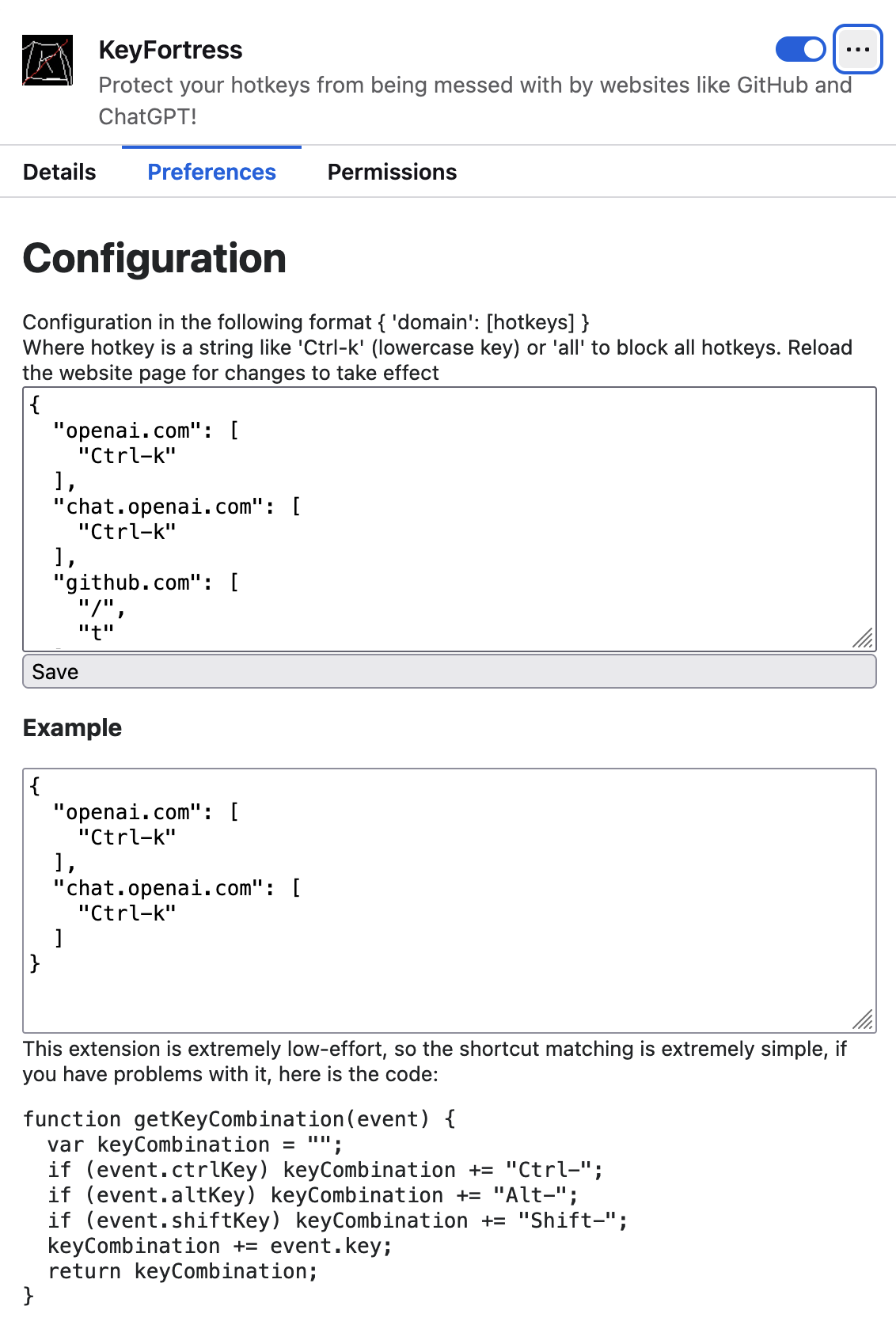
<p>Next, I needed to add some configuration options so that I wouldn’t have
to rebuild the extension every time I wanted to add more websites and shortcuts.
I didn’t want to disable all overrides on all websites, as many of them are
actually useful. Creating a proper UI seemed like a lot of work, so I opted
for the simplest solution: a JSON config!</p>

<p>Chatting with ChatGPT provided me with prototypes for
options.html and options.js. However, they didn’t work.
After some debugging, I discovered that you can’t have callbacks when
blocking event propagation, which actually made the extension better,
in my opinion.
Instead of checking the configuration on every key event, we can load it on
page load and save it to a <code class="language-plaintext highlighter-rouge">window</code> variable.
Then, we can simply check the window variable. This method is likely faster,
as we don’t need to use the browser.sync API very often.</p>

<p><img src="/blog_assets/key_fortress_config.png" alt="simplest possible config - the only UI this addon has" /></p>

<p>That might look terrible, but it works! And I don’t need anything else, do you?
Having the config just as a text file, it’s easy to copy and paste all of it, or parts of it,
it’s easy to share it with other people or copy to your other browser, easy to back it up, etc. I actually love that solution! Why reinvent the wheel?</p>

<p>The rest of the process involved cleaning up some debug statements,
drawing an icon in 5 minutes, asking ChatGPT to come up with a name,
and submitting it to addons.mozilla.org.</p>

<p>We’ll see if Mozilla accepts it. I’ll update this blog post when I hear back from them.</p>

<p>The entire process took about 3 hours, including submitting to
addons.mozilla.org, drawing the icon, debugging, etc.
Actually, most of it was the boring stuff, like figuring out how to make an
icon and what else I needed to submit.</p>

<p>Surprisingly, it was easy overall. I didn’t expect it to take only 3 hours,
considering I had almost zero knowledge of how browser extensions are made!</p>

<p>I’m not sure if anyone’s going to use it, but hey,
why not spend an extra hour and publish it?</p>]]></content><author><name></name></author><category term="misc" /><summary type="html"><![CDATA[How little time can I spend to make a useful extension? - about 3hr]]></summary></entry><entry><title type="html">unmenu - macos app launcher</title><link href="https://unmb.pw/blog/misc/2024/01/22/unmenu.html" rel="alternate" type="text/html" title="unmenu - macos app launcher" /><published>2024-01-22T10:02:13-03:00</published><updated>2024-01-22T10:02:13-03:00</updated><id>https://unmb.pw/blog/misc/2024/01/22/unmenu</id><content type="html" xml:base="https://unmb.pw/blog/misc/2024/01/22/unmenu.html"><![CDATA[<p><img src="/blog_assets/unmenu.png" alt="unmenu" /></p>

<p><img src="/blog_assets/unmenu-icon.png" alt="unmenu" style="float: left" />
<a href="https://github.com/unmanbearpig/unmenu">Link to repository: github.com/unmanbearpig/unmenu</a></p>

<p><a href="https://github.com/unmanbearpig/unmenu/releases/">Download here</a></p>

<p>A long time ago, I was using Alfred for launching apps on my Mac. Then Apple introduced Spotlight, and I switched to that because it’s a one less dependency. And then I switched to Gentoo and used dmenu. Now, when I’m using both Gentoo and mac, I’ve noticed how bad Spotlight is compared to dmenu - a dead simple fast app that does the job well enough.</p>

<p>dmenu is one of the suckless.org apps. Their philosophy is minimalism to the point of having configs in “.h” files, so that you need to recompile it every time you change the config. I don’t use a lot of their apps but have respect for their dedication to simplicity. unmenu is not as simple, for the most part because it’s a pain to compile and install compared to something like dmenu in linux.</p>

<p>So, what I found wrong with Spotlight:</p>

<ul>
  <li>Imperfect fuzzy matching, like “ws” not matching anything even when “Wireshark” and “WhatsApp” are available.</li>
  <li>It needs to index stuff.</li>
  <li>Has web search and too many other features that are hard to disable. At least I couldn’t.</li>
  <li>It searches who knows what, often finding random files by even when I disabled searching everywhere but the “/Applications” directory.</li>
  <li>Not scriptable, can’t launch anything except .app bundles.</li>
  <li>Not consistent. The same string might be completed to one app today and to another app tomorrow.</li>
  <li>Not debuggable. There is no Terminal.app in my Spotlight for some reason. How do I debug this? I don’t know.</li>
</ul>

<p>I could probably fix some of those issues, but overall, it seems like a wrong tool for the job. I don’t want most of the features it offers, and the ones that I do want don’t work the way I want them to. Luckily, <a href="https://github.com/oNaiPs">José Luis Pereira</a> wrote <a href="https://github.com/oNaiPs/dmenu-mac">dmenu-mac</a>, which is almost exactly what I wanted. But with a few issues, like <a href="https://github.com/oNaiPs/dmenu-mac/issues/41">this bug</a> that switches to another desktop randomly when hitting the hotkey, or some issues with completion. So, I forked it to fix everything that bothers me and add some features.</p>

<h3 id="changes-from-dmenu-mac">Changes from dmenu-mac</h3>

<ul>
  <li>Fixed a <a href="https://github.com/oNaiPs/dmenu-mac/issues/41">longstanding issue</a>.</li>
  <li>Switched to Accessibility API for handling hotkeys because it seems to work well.</li>
  <li>Implemented what I believe to be a superior fuzzy matching algorithm, leveraging <a href="https://crates.io/crates/fuzzy-matcher">lotabout/fuzzy-matcher</a>.</li>
  <li>Introduced a configuration file located at <code class="language-plaintext highlighter-rouge">~/.config/unmenu/config.toml</code>, enabling users to customize search directories, filter out applications, and integrate scripts and aliases.</li>
</ul>

<h3 id="examples-of-scripts-and-aliases">Examples of scripts and aliases</h3>

<h4 id="generate-a-qr-code">Generate a QR code</h4>

<p>Create a file in one of the directories listed in unmenu’s config with the following content. It’ll generate and show a QR code from the copied text.
Don’t forget to <code class="language-plaintext highlighter-rouge">chmod +x</code> this file</p>

<div class="language-sh highlighter-rouge"><div class="highlight"><pre class="highlight"><code><span class="c">#!/bin/sh</span>

<span class="nb">set</span> <span class="nt">-e</span>

<span class="nv">FILENAME</span><span class="o">=</span><span class="s2">"/tmp/</span><span class="si">$(</span><span class="nb">date</span><span class="si">)</span><span class="s2">.png"</span>

pbpaste | qrencode <span class="nt">-o</span> <span class="s2">"</span><span class="nv">$FILENAME</span><span class="s2">"</span>
open <span class="s2">"</span><span class="nv">$FILENAME</span><span class="s2">"</span>
</code></pre></div></div>

<h4 id="alias--run-cli-command-from-unmenu">Alias / run CLI command from unmenu</h4>
<p>To allow to run scrcpy from unmenu create a file <code class="language-plaintext highlighter-rouge">scrcpy</code> with the following content:</p>

<div class="language-sh highlighter-rouge"><div class="highlight"><pre class="highlight"><code><span class="c">#!/bin/sh</span>

scrcpy
</code></pre></div></div>

<h4 id="open-video-in-mpv-video-player">Open video in mpv video player</h4>
<div class="language-sh highlighter-rouge"><div class="highlight"><pre class="highlight"><code><span class="c">#!/bin/sh</span>

mpv <span class="sb">`</span>pbpaste<span class="sb">`</span>
</code></pre></div></div>

<h3 id="implementation">Implementation</h3>

<h4 id="style">Style</h4>

<p>Intentionally quick and dirty. I never finish my projects because of my desire to improve one thing or another before writing a blog post or even README and publishing it somewhere. So this time I focused on making it work the way I want and not worrying about how exactly I’ve done it and if the code looks good. The code is terrible, there are still some debug statements, commented out code, most git commit messages are 1 line if not 1 word or 1 character. But who cares! I’ve been using it for half a year without an issue. There is not much code so I’ll figure it out next time I need to change something, which would probably happen not sooner than in a year.
Works well enough for me already, so there is nothing to change.</p>

<h4 id="hotkey-handling">Hotkey handling</h4>

<p>I suspected that deprecated APIs like <code class="language-plaintext highlighter-rouge">getEventMonitorTarget</code> that were used originally were the cause of the bugs, so I switched to the API that requires additional permissions but seems to work without an issue.</p>

<h4 id="fuzzy-matching">Fuzzy matching</h4>

<p>I’ve chosen to use a Rust library (https://github.com/lotabout/fuzzy-matcher) for fuzzy matching, mostly because Rust is more familiar, and I don’t need to use Xcode for that part of the project. Works well enough for now. I needed to make an interop via C API, and had to debug a few issues with my memory management, but that’s okay. I probably learned something along the way, but I did that part half a year ago so don’t really remember. I should really write the blog post just after I implement something interesting instead of waiting for half a year.</p>

<h3 id="llm-conclusion">LLM Conclusion</h3>

<p>Unmenu, my fork of dmenu-mac, aims to provide a more efficient and reliable application launcher for macOS users who prefer a keyboard-centric workflow. By addressing the limitations and bugs found in dmenu-mac and Spotlight, Unmenu offers a superior fuzzy matching algorithm, hotkey handling, and a customizable configuration file. This project not only improves upon the original dmenu-mac but also enhances the overall user experience by making app launching faster and more intuitive.</p>]]></content><author><name></name></author><category term="misc" /><summary type="html"><![CDATA[No indexing, no animations, fast and high quality matching]]></summary></entry><entry><title type="html">Overclocking mouse by patching Linux kernel</title><link href="https://unmb.pw/blog/misc/2022/06/09/linux-kernel-mouse-overclocking.html" rel="alternate" type="text/html" title="Overclocking mouse by patching Linux kernel" /><published>2022-06-09T09:02:13-04:00</published><updated>2022-06-09T09:02:13-04:00</updated><id>https://unmb.pw/blog/misc/2022/06/09/linux-kernel-mouse-overclocking</id><content type="html" xml:base="https://unmb.pw/blog/misc/2022/06/09/linux-kernel-mouse-overclocking.html"><![CDATA[<p>So I have this old Logitech MX518 mouse that I love. I haven’t played any
games in a while, but recently found Xonotic and got quite decent at it.
Me being a bit obsessed with latency and Xonotic being very fast game,
I’ve decided to improve the input latency as much as possible.</p>

<p>I remember that years and years ago I was able to increase the poll rate of
this exact mouse to 500 hz (default rate is 125 hz) in Windows.
Theoretically it should reduce the mouse latency and improve its smoothness
and accuracy when moving very fast.</p>

<p>I’ve tried looking for software for linux that would do that, but couldn’t
find anything that works.
So I’ve decided to dig into it a bit more.</p>

<h2 id="measure">Measure</h2>

<p>We can’t optimize anything unless we measure it.</p>

<p>In Linux each input device is a file in <code class="language-plaintext highlighter-rouge">/dev/input/</code>, for example my mouse
is at <code class="language-plaintext highlighter-rouge">/dev/input/by-id/usb-Logitech_USB-PS_2_Optical_Mouse-event-mouse</code>.</p>

<p>We can just read the data from it like so:</p>

<p><code class="language-plaintext highlighter-rouge">&gt; sudo cat /dev/input/by-id/usb-Logitech_USB-PS_2_Optical_Mouse-event-mouse | xxd</code></p>

<div class="language-plaintext highlighter-rouge"><div class="highlight"><pre class="highlight"><code>00000000: 4e1a a362 0000 0000 5ea5 0400 0000 0000  N..b....^.......
00000010: 0200 0100 ffff ffff 4e1a a362 0000 0000  ........N..b....
00000020: 5ea5 0400 0000 0000 0000 0000 0000 0000  ^...............
00000030: 4e1a a362 0000 0000 d8bc 0400 0000 0000  N..b............
00000040: 0200 0100 ffff ffff 4e1a a362 0000 0000  ........N..b....
00000050: d8bc 0400 0000 0000 0000 0000 0000 0000  ................
00000060: 4e1a a362 0000 0000 33cc 0400 0000 0000  N..b....3.......
00000070: 0200 0000 0100 0000 4e1a a362 0000 0000  ........N..b....
00000080: 33cc 0400 0000 0000 0200 0100 ffff ffff  3...............
00000090: 4e1a a362 0000 0000 33cc 0400 0000 0000  N..b....3.......
000000a0: 0000 0000 0000 0000 4e1a a362 0000 0000  ........N..b....
000000b0: d6db 0400 0000 0000 0200 0100 ffff ffff  ................
</code></pre></div></div>
<p>As we move the mouse we get a bunch of data on the screen.</p>

<p>So we can measure the delays between the data batches and hopefully get
the actual mouse rate.</p>

<p>I’ve written a simple Rust program that performs a crude measurement
<a href="https://github.com/unmanbearpig/hid_rate">here (unmanbearpig/hid_rate)</a></p>

<p>here is a snippet from it:</p>

<div class="language-rust highlighter-rouge"><div class="highlight"><pre class="highlight"><code><span class="k">loop</span> <span class="p">{</span>
    <span class="n">last_time</span> <span class="o">=</span> <span class="nn">time</span><span class="p">::</span><span class="nn">Instant</span><span class="p">::</span><span class="nf">now</span><span class="p">();</span>
    <span class="k">let</span> <span class="n">bytes_read</span> <span class="o">=</span> <span class="n">file</span><span class="nf">.read</span><span class="p">(</span><span class="o">&amp;</span><span class="k">mut</span> <span class="n">buf</span><span class="p">)</span><span class="o">?</span><span class="p">;</span>
    <span class="k">let</span> <span class="n">elapsed</span> <span class="o">=</span> <span class="n">last_time</span><span class="nf">.elapsed</span><span class="p">();</span>
    <span class="k">let</span> <span class="n">secs</span> <span class="o">=</span> <span class="n">elapsed</span><span class="nf">.as_secs_f64</span><span class="p">();</span>
    <span class="k">let</span> <span class="n">hz</span> <span class="o">=</span> <span class="mf">1.0</span> <span class="o">/</span> <span class="n">secs</span><span class="p">;</span>

    <span class="nd">println!</span><span class="p">(</span><span class="s">"{:14} ns, {:&gt;14.3} us, {:10.5} hz, {:4} bytes read"</span><span class="p">,</span>
             <span class="n">elapsed</span><span class="nf">.as_nanos</span><span class="p">(),</span> <span class="n">secs</span> <span class="o">*</span> <span class="mf">1000_000.0</span><span class="p">,</span> <span class="n">hz</span><span class="p">,</span> <span class="n">bytes_read</span><span class="p">);</span>
<span class="p">}</span>
</code></pre></div></div>

<p>Here we just read some data in a loop and measure how long each iteration took.
From the duration it’s trivial to calculate the rate, so it’s easier to read.</p>

<p>Let’s run it on the device file of our mouse and move the mouse a bit.</p>

<p><code class="language-plaintext highlighter-rouge">&gt; hid_rate /dev/input/by-id/usb-Logitech_USB-PS_2_Optical_Mouse-event-mouse</code></p>
<div class="language-plaintext highlighter-rouge"><div class="highlight"><pre class="highlight"><code>       7982385 ns,       7982.385 us,  125.27584 hz,   72 bytes read
       8002035 ns,       8002.035 us,  124.96821 hz,   72 bytes read
       7962256 ns,       7962.256 us,  125.59255 hz,   72 bytes read
       7988828 ns,       7988.828 us,  125.17481 hz,   72 bytes read
       8011032 ns,       8011.032 us,  124.82786 hz,   72 bytes read
       7966524 ns,       7966.524 us,  125.52526 hz,   72 bytes read
       7993312 ns,       7993.312 us,  125.10459 hz,   72 bytes read
       7986931 ns,       7986.931 us,  125.20454 hz,   48 bytes read
       7981237 ns,       7981.237 us,  125.29386 hz,   48 bytes read
</code></pre></div></div>

<p>Nice! we get 125 hz, which is the default poll rate and it’s what we expect.</p>

<h2 id="usb-configuration">USB configuration</h2>

<p>I’m not an expert in USB, but as far as I know USB devices never send data to
the host unannounced. They only respond to host’s queries. The host polls the
device for new data at a certain rate to check if device has any new data
to send.</p>

<p>Different devices have different rates they support, that supported rate is
sent by the device at configuration time in the <code class="language-plaintext highlighter-rouge">bInterval</code> field of the
descriptor. More specifically <code class="language-plaintext highlighter-rouge">bInterval</code> is the delay in milliseconds between
requests. It means slightly different things for different devices and speeds.</p>

<p>Universal Serial Bus Specification:</p>

<blockquote>
  <p>Interval for polling endpoint for data transfers.</p>

  <p>Expressed in frames or microframes depending on the device operating speed
(i.e., either 1 millisecond or 125 μs units).</p>

  <p>For full-/high-speed isochronous endpoints, this value
must be in the range from 1 to 16. The <em>bInterval</em> value
is used as the exponent for a 2<sup>bInterval-1</sup> value; e.g., a
<em>bInterval</em> of 4 means a period of 8 (2<sup>4-1</sup>).</p>

  <p>For full-/low-speed interrupt endpoints, the value of
this field may be from 1 to 255.</p>

  <p>For high-speed interrupt endpoints, the <em>bInterval</em> value
is used as the exponent for a 2<sup>4-1</sup>
This value must be from 1 to 16.</p>
</blockquote>

<p>We don’t care about High-Speed, as mice are never High Speed.
So for our device a frame is just 1ms and <code class="language-plaintext highlighter-rouge">bInterval</code> is the number
of frame and also milliseconds.</p>

<p>We can find the device’s configuration by <code class="language-plaintext highlighter-rouge">lsusb -v</code></p>

<p><code class="language-plaintext highlighter-rouge">&gt; lsusb -v</code></p>

<div class="language-plaintext highlighter-rouge"><div class="highlight"><pre class="highlight"><code>Bus 001 Device 007: ID 046d:c051 Logitech, Inc. G3 (MX518) Optical Mouse
Device Descriptor:
  bLength                18
  bDescriptorType         1
  bcdUSB               2.00
  bDeviceClass            0 
  bDeviceSubClass         0 
  bDeviceProtocol         0 
  bMaxPacketSize0         8
  idVendor           0x046d Logitech, Inc.
  idProduct          0xc051 G3 (MX518) Optical Mouse
  bcdDevice           30.00
  iManufacturer           1 Logitech
  iProduct                2 USB-PS/2 Optical Mouse
  iSerial                 0 
  bNumConfigurations      1
  Configuration Descriptor:
    bLength                 9
    bDescriptorType         2
    wTotalLength       0x0022
    bNumInterfaces          1
    bConfigurationValue     1
    iConfiguration          0 
    bmAttributes         0xa0
      (Bus Powered)
      Remote Wakeup
    MaxPower               98mA
    Interface Descriptor:
      bLength                 9
      bDescriptorType         4
      bInterfaceNumber        0
      bAlternateSetting       0
      bNumEndpoints           1
      bInterfaceClass         3 Human Interface Device
      bInterfaceSubClass      1 Boot Interface Subclass
      bInterfaceProtocol      2 Mouse
      iInterface              0 
        HID Device Descriptor:
          bLength                 9
          bDescriptorType        33
          bcdHID               1.10
          bCountryCode            0 Not supported
          bNumDescriptors         1
          bDescriptorType        34 Report
          wDescriptorLength      77
         Report Descriptors: 
           ** UNAVAILABLE **
      Endpoint Descriptor:
        bLength                 7
        bDescriptorType         5
        bEndpointAddress     0x81  EP 1 IN
        bmAttributes            3
          Transfer Type            Interrupt
          Synch Type               None
          Usage Type               Data
        wMaxPacketSize     0x0008  1x 8 bytes
        bInterval              10

</code></pre></div></div>

<p>So our mice’s <code class="language-plaintext highlighter-rouge">bInterval</code> is 10 ms. Aparrently it’s rounded to the nearest
power of 2 to 8 ms. So to get the polling rate we divide 1000ms (in a second)
by our <code class="language-plaintext highlighter-rouge">bInterval</code> which is rounded to 8 and get 125 hz.</p>

<p>To “overclock” our mouse we need to somehow make Linux think that the device’s
supported rate is 500hz, which means we need to set <code class="language-plaintext highlighter-rouge">bInterval</code> to 2 (ms).</p>

<h2 id="patching-the-kernel">Patching the kernel</h2>

<p>First, let’s get the kernel source code, extract the archive and <code class="language-plaintext highlighter-rouge">cd</code> into it.
This step might be different for different distributions.
We need to be able to build it and run it, which I can do.</p>

<p>I’m using the latest stable kernel version which right now is 5.18.3.</p>

<p>Now let’s make sure that there isn’t a driver or a special case for this
specific mouse somewhere in the kernel. To do that I’ll just grep for
something that might be a name or id if this mouse.</p>

<p>I use <code class="language-plaintext highlighter-rouge">ripgrep</code> instead of <code class="language-plaintext highlighter-rouge">grep</code>, but it’s not important.</p>

<div class="language-plaintext highlighter-rouge"><div class="highlight"><pre class="highlight"><code>&gt; cd drivers
&gt; rg -i 'mx518'
</code></pre></div></div>

<p>Found nothing. How about MX followed by 3 numbers?</p>

<p><code class="language-plaintext highlighter-rouge">&gt; rg -i 'mx\d\d\d\b'</code></p>
<div class="language-plaintext highlighter-rouge"><div class="highlight"><pre class="highlight"><code>...
input/mouse/logips2pp.c: { 61,	PS2PP_KIND_MX,					/* MX700 */
input/mouse/logips2pp.c: { 100,	PS2PP_KIND_MX,					/* MX510 */
input/mouse/logips2pp.c: { 111,  PS2PP_KIND_MX,	PS2PP_WHEEL | PS2PP_SIDE_BTN },	/* MX300 reports task button as side */
input/mouse/logips2pp.c: { 112,	PS2PP_KIND_MX,					/* MX500 */
input/mouse/logips2pp.c: { 114,	PS2PP_KIND_MX,					/* MX310 */
...
</code></pre></div></div>

<p>Looks interesting…</p>

<div class="language-c highlighter-rouge"><div class="highlight"><pre class="highlight"><code><span class="c1">// SPDX-License-Identifier: GPL-2.0-only</span>
<span class="cm">/*
 * Logitech PS/2++ mouse driver
 *
 * Copyright (c) 1999-2003 Vojtech Pavlik &lt;vojtech@suse.cz&gt;
 * Copyright (c) 2003 Eric Wong &lt;eric@yhbt.net&gt;
 */</span>
</code></pre></div></div>

<p>It’s a PS/2 not USB driver, so let’s ignore that.</p>

<p>Now let’s look for the <code class="language-plaintext highlighter-rouge">idProduct</code> of our mouse, which is <code class="language-plaintext highlighter-rouge">0xc051</code>:</p>

<p><code class="language-plaintext highlighter-rouge">&gt; rg 'c051'</code></p>

<div class="language-plaintext highlighter-rouge"><div class="highlight"><pre class="highlight"><code>sound/pci/hda/patch_realtek.c
11238:	SND_PCI_QUIRK(0x144d, 0xc051, "Samsung R720", ALC662_FIXUP_IDEAPAD),

lib/crypto/chacha20poly1305-selftest.c
2980:static const u8 enc_assoc051[] __initconst = {
6033:	{ enc_input051, enc_output051, enc_assoc051, enc_nonce051, enc_key051,
6034:	  sizeof(enc_input051), sizeof(enc_assoc051), sizeof(enc_nonce051) },

drivers/gpu/drm/amd/include/asic_reg/gca/gfx_8_1_d.h
463:#define mmSCRATCH_ADDR                                                          0xc051

drivers/gpu/drm/amd/include/asic_reg/gca/gfx_8_0_d.h
463:#define mmSCRATCH_ADDR                                                          0xc051

drivers/gpu/drm/amd/include/asic_reg/gca/gfx_7_0_d.h
413:#define mmSCRATCH_ADDR                                                          0xc051

drivers/gpu/drm/amd/include/asic_reg/gca/gfx_7_2_d.h
425:#define mmSCRATCH_ADDR                                                          0xc051

drivers/gpu/drm/amd/pm/powerplay/inc/polaris10_pwrvirus.h
1117:	0x04200001, 0x7e2a0004, 0xce013084, 0x90000000, 0x28340001, 0x313c0bcc, 0x9bc00010, 0x393c051f,

drivers/gpu/drm/sun4i/sun8i_vi_scaler.c
210:	0x00fc051f, 0x00fc0521, 0x00fc0621, 0x00fc0721,

tools/testing/ktest/sample.conf
1031:#   IGNORE_WARNINGS = 42f9c6b69b54946ffc0515f57d01dc7f5c0e4712 0c17ca2c7187f431d8ffc79e81addc730f33d128
</code></pre></div></div>

<p>Nothing related to mice or Logitech.</p>

<p>Now that we are somewhat sure that there is no specific driver for our mouse
let’s try to find where <code class="language-plaintext highlighter-rouge">bInterval</code> is being set for all devices.</p>

<p>Searching for <code class="language-plaintext highlighter-rouge">bInterval</code> resulted in the following interesting code in</p>

<p><code class="language-plaintext highlighter-rouge">drivers/usb/core/config.c</code>:</p>

<div class="language-c highlighter-rouge"><div class="highlight"><pre class="highlight"><code><span class="k">static</span> <span class="kt">int</span> <span class="n">usb_parse_endpoint</span><span class="p">(</span><span class="k">struct</span> <span class="n">device</span> <span class="o">*</span><span class="n">ddev</span><span class="p">,</span> <span class="kt">int</span> <span class="n">cfgno</span><span class="p">,</span>
	<span class="k">struct</span> <span class="n">usb_host_config</span> <span class="o">*</span><span class="n">config</span><span class="p">,</span> <span class="kt">int</span> <span class="n">inum</span><span class="p">,</span> <span class="kt">int</span> <span class="n">asnum</span><span class="p">,</span>
	<span class="k">struct</span> <span class="n">usb_host_interface</span> <span class="o">*</span><span class="n">ifp</span><span class="p">,</span> <span class="kt">int</span> <span class="n">num_ep</span><span class="p">,</span>
	<span class="kt">unsigned</span> <span class="kt">char</span> <span class="o">*</span><span class="n">buffer</span><span class="p">,</span> <span class="kt">int</span> <span class="n">size</span><span class="p">)</span>

<span class="p">...</span>

<span class="cm">/*
 * Fix up bInterval values outside the legal range.
 * Use 10 or 8 ms if no proper value can be guessed.
 */</span>
<span class="n">i</span> <span class="o">=</span> <span class="mi">0</span><span class="p">;</span>		<span class="cm">/* i = min, j = max, n = default */</span>
<span class="n">j</span> <span class="o">=</span> <span class="mi">255</span><span class="p">;</span>
<span class="k">if</span> <span class="p">(</span><span class="n">usb_endpoint_xfer_int</span><span class="p">(</span><span class="n">d</span><span class="p">))</span> <span class="p">{</span>
	<span class="n">i</span> <span class="o">=</span> <span class="mi">1</span><span class="p">;</span>
	<span class="k">switch</span> <span class="p">(</span><span class="n">udev</span><span class="o">-&gt;</span><span class="n">speed</span><span class="p">)</span> <span class="p">{</span>
	<span class="k">case</span> <span class="n">USB_SPEED_SUPER_PLUS</span><span class="p">:</span>
	<span class="k">case</span> <span class="n">USB_SPEED_SUPER</span><span class="p">:</span>
	<span class="k">case</span> <span class="n">USB_SPEED_HIGH</span><span class="p">:</span>
		<span class="cm">/*
		 * Many device manufacturers are using full-speed
		 * bInterval values in high-speed interrupt endpoint
		 * descriptors. Try to fix those and fall back to an
		 * 8-ms default value otherwise.
		 */</span>
		<span class="n">n</span> <span class="o">=</span> <span class="n">fls</span><span class="p">(</span><span class="n">d</span><span class="o">-&gt;</span><span class="n">bInterval</span><span class="o">*</span><span class="mi">8</span><span class="p">);</span>
		<span class="k">if</span> <span class="p">(</span><span class="n">n</span> <span class="o">==</span> <span class="mi">0</span><span class="p">)</span>
			<span class="n">n</span> <span class="o">=</span> <span class="mi">7</span><span class="p">;</span>	<span class="cm">/* 8 ms = 2^(7-1) uframes */</span>
		<span class="n">j</span> <span class="o">=</span> <span class="mi">16</span><span class="p">;</span>

		<span class="cm">/*
		 * Adjust bInterval for quirked devices.
		 */</span>
		<span class="cm">/*
		 * This quirk fixes bIntervals reported in ms.
		 */</span>
		<span class="k">if</span> <span class="p">(</span><span class="n">udev</span><span class="o">-&gt;</span><span class="n">quirks</span> <span class="o">&amp;</span> <span class="n">USB_QUIRK_LINEAR_FRAME_INTR_BINTERVAL</span><span class="p">)</span> <span class="p">{</span>
			<span class="n">n</span> <span class="o">=</span> <span class="n">clamp</span><span class="p">(</span><span class="n">fls</span><span class="p">(</span><span class="n">d</span><span class="o">-&gt;</span><span class="n">bInterval</span><span class="p">)</span> <span class="o">+</span> <span class="mi">3</span><span class="p">,</span> <span class="n">i</span><span class="p">,</span> <span class="n">j</span><span class="p">);</span>
			<span class="n">i</span> <span class="o">=</span> <span class="n">j</span> <span class="o">=</span> <span class="n">n</span><span class="p">;</span>
		<span class="p">}</span>
		<span class="cm">/*
		 * This quirk fixes bIntervals reported in
		 * linear microframes.
		 */</span>
		<span class="k">if</span> <span class="p">(</span><span class="n">udev</span><span class="o">-&gt;</span><span class="n">quirks</span> <span class="o">&amp;</span> <span class="n">USB_QUIRK_LINEAR_UFRAME_INTR_BINTERVAL</span><span class="p">)</span> <span class="p">{</span>
			<span class="n">n</span> <span class="o">=</span> <span class="n">clamp</span><span class="p">(</span><span class="n">fls</span><span class="p">(</span><span class="n">d</span><span class="o">-&gt;</span><span class="n">bInterval</span><span class="p">),</span> <span class="n">i</span><span class="p">,</span> <span class="n">j</span><span class="p">);</span>
			<span class="n">i</span> <span class="o">=</span> <span class="n">j</span> <span class="o">=</span> <span class="n">n</span><span class="p">;</span>
		<span class="p">}</span>
		<span class="k">break</span><span class="p">;</span>
	<span class="nl">default:</span>		<span class="cm">/* USB_SPEED_FULL or _LOW */</span>
		<span class="cm">/*
		 * For low-speed, 10 ms is the official minimum.
		 * But some "overclocked" devices might want faster
		 * polling so we'll allow it.
		 */</span>
		<span class="n">n</span> <span class="o">=</span> <span class="mi">10</span><span class="p">;</span>
		<span class="k">break</span><span class="p">;</span>
	<span class="p">}</span>
<span class="p">}</span> <span class="k">else</span> <span class="nf">if</span> <span class="p">(</span><span class="n">usb_endpoint_xfer_isoc</span><span class="p">(</span><span class="n">d</span><span class="p">))</span> <span class="p">{</span>
	<span class="n">i</span> <span class="o">=</span> <span class="mi">1</span><span class="p">;</span>
	<span class="n">j</span> <span class="o">=</span> <span class="mi">16</span><span class="p">;</span>
	<span class="k">switch</span> <span class="p">(</span><span class="n">udev</span><span class="o">-&gt;</span><span class="n">speed</span><span class="p">)</span> <span class="p">{</span>
	<span class="k">case</span> <span class="n">USB_SPEED_HIGH</span><span class="p">:</span>
		<span class="n">n</span> <span class="o">=</span> <span class="mi">7</span><span class="p">;</span>		<span class="cm">/* 8 ms = 2^(7-1) uframes */</span>
		<span class="k">break</span><span class="p">;</span>
	<span class="nl">default:</span>		<span class="cm">/* USB_SPEED_FULL */</span>
		<span class="n">n</span> <span class="o">=</span> <span class="mi">4</span><span class="p">;</span>		<span class="cm">/* 8 ms = 2^(4-1) frames */</span>
		<span class="k">break</span><span class="p">;</span>
	<span class="p">}</span>
<span class="p">}</span>
<span class="k">if</span> <span class="p">(</span><span class="n">d</span><span class="o">-&gt;</span><span class="n">bInterval</span> <span class="o">&lt;</span> <span class="n">i</span> <span class="o">||</span> <span class="n">d</span><span class="o">-&gt;</span><span class="n">bInterval</span> <span class="o">&gt;</span> <span class="n">j</span><span class="p">)</span> <span class="p">{</span>
	<span class="n">dev_warn</span><span class="p">(</span><span class="n">ddev</span><span class="p">,</span> <span class="s">"config %d interface %d altsetting %d "</span>
	    <span class="s">"endpoint 0x%X has an invalid bInterval %d, "</span>
	    <span class="s">"changing to %d</span><span class="se">\n</span><span class="s">"</span><span class="p">,</span>
	    <span class="n">cfgno</span><span class="p">,</span> <span class="n">inum</span><span class="p">,</span> <span class="n">asnum</span><span class="p">,</span>
	    <span class="n">d</span><span class="o">-&gt;</span><span class="n">bEndpointAddress</span><span class="p">,</span> <span class="n">d</span><span class="o">-&gt;</span><span class="n">bInterval</span><span class="p">,</span> <span class="n">n</span><span class="p">);</span>
	<span class="n">endpoint</span><span class="o">-&gt;</span><span class="n">desc</span><span class="p">.</span><span class="n">bInterval</span> <span class="o">=</span> <span class="n">n</span><span class="p">;</span>
<span class="p">}</span>

<span class="cm">/* Some buggy low-speed devices have Bulk endpoints, which is
 * explicitly forbidden by the USB spec.  In an attempt to make
 * them usable, we will try treating them as Interrupt endpoints.
 */</span>
<span class="k">if</span> <span class="p">(</span><span class="n">udev</span><span class="o">-&gt;</span><span class="n">speed</span> <span class="o">==</span> <span class="n">USB_SPEED_LOW</span> <span class="o">&amp;&amp;</span> <span class="n">usb_endpoint_xfer_bulk</span><span class="p">(</span><span class="n">d</span><span class="p">))</span> <span class="p">{</span>
	<span class="n">dev_warn</span><span class="p">(</span><span class="n">ddev</span><span class="p">,</span> <span class="s">"config %d interface %d altsetting %d "</span>
	    <span class="s">"endpoint 0x%X is Bulk; changing to Interrupt</span><span class="se">\n</span><span class="s">"</span><span class="p">,</span>
	    <span class="n">cfgno</span><span class="p">,</span> <span class="n">inum</span><span class="p">,</span> <span class="n">asnum</span><span class="p">,</span> <span class="n">d</span><span class="o">-&gt;</span><span class="n">bEndpointAddress</span><span class="p">);</span>
	<span class="n">endpoint</span><span class="o">-&gt;</span><span class="n">desc</span><span class="p">.</span><span class="n">bmAttributes</span> <span class="o">=</span> <span class="n">USB_ENDPOINT_XFER_INT</span><span class="p">;</span>
	<span class="n">endpoint</span><span class="o">-&gt;</span><span class="n">desc</span><span class="p">.</span><span class="n">bInterval</span> <span class="o">=</span> <span class="mi">1</span><span class="p">;</span>
	<span class="k">if</span> <span class="p">(</span><span class="n">usb_endpoint_maxp</span><span class="p">(</span><span class="o">&amp;</span><span class="n">endpoint</span><span class="o">-&gt;</span><span class="n">desc</span><span class="p">)</span> <span class="o">&gt;</span> <span class="mi">8</span><span class="p">)</span>
		<span class="n">endpoint</span><span class="o">-&gt;</span><span class="n">desc</span><span class="p">.</span><span class="n">wMaxPacketSize</span> <span class="o">=</span> <span class="n">cpu_to_le16</span><span class="p">(</span><span class="mi">8</span><span class="p">);</span>
<span class="p">}</span>

<span class="cm">/*
 * Validate the wMaxPacketSize field.
 * Some devices have isochronous endpoints in altsetting 0;
 * the USB-2 spec requires such endpoints to have wMaxPacketSize = 0
 * (see the end of section 5.6.3), so don't warn about them.
 */</span>
<span class="n">maxp</span> <span class="o">=</span> <span class="n">le16_to_cpu</span><span class="p">(</span><span class="n">endpoint</span><span class="o">-&gt;</span><span class="n">desc</span><span class="p">.</span><span class="n">wMaxPacketSize</span><span class="p">);</span>
<span class="k">if</span> <span class="p">(</span><span class="n">maxp</span> <span class="o">==</span> <span class="mi">0</span> <span class="o">&amp;&amp;</span> <span class="o">!</span><span class="p">(</span><span class="n">usb_endpoint_xfer_isoc</span><span class="p">(</span><span class="n">d</span><span class="p">)</span> <span class="o">&amp;&amp;</span> <span class="n">asnum</span> <span class="o">==</span> <span class="mi">0</span><span class="p">))</span> <span class="p">{</span>

<span class="p">...</span>

</code></pre></div></div>

<p>It looks like this code is setting <code class="language-plaintext highlighter-rouge">bInterval</code> based on device speed and
other things. Probably a decent place we can insert our code into.</p>

<p>Judging by the comments the code here sets <code class="language-plaintext highlighter-rouge">endpoint-&gt;desc.bInterval</code>
to override it, so let’s try doing the same.</p>

<div class="language-c highlighter-rouge"><div class="highlight"><pre class="highlight"><code><span class="p">...</span>

<span class="err">}</span> <span class="k">else</span> <span class="nf">if</span> <span class="p">(</span><span class="n">usb_endpoint_xfer_isoc</span><span class="p">(</span><span class="n">d</span><span class="p">))</span> <span class="p">{</span>
	<span class="n">i</span> <span class="o">=</span> <span class="mi">1</span><span class="p">;</span>
	<span class="n">j</span> <span class="o">=</span> <span class="mi">16</span><span class="p">;</span>
	<span class="k">switch</span> <span class="p">(</span><span class="n">udev</span><span class="o">-&gt;</span><span class="n">speed</span><span class="p">)</span> <span class="p">{</span>
	<span class="k">case</span> <span class="n">USB_SPEED_HIGH</span><span class="p">:</span>
		<span class="n">n</span> <span class="o">=</span> <span class="mi">7</span><span class="p">;</span>		<span class="cm">/* 8 ms = 2^(7-1) uframes */</span>
		<span class="k">break</span><span class="p">;</span>
	<span class="nl">default:</span>		<span class="cm">/* USB_SPEED_FULL */</span>
		<span class="n">n</span> <span class="o">=</span> <span class="mi">4</span><span class="p">;</span>		<span class="cm">/* 8 ms = 2^(4-1) frames */</span>
		<span class="k">break</span><span class="p">;</span>
	<span class="p">}</span>
<span class="p">}</span>

<span class="cm">/* unmanbearpig: MX518 mouse hack */</span>
<span class="cm">/* The MX518 mouse supports 500 hz poll rate, but reports only 125 hz,
 * we can override it to get the faster rate */</span>
<span class="k">if</span> <span class="p">(</span><span class="n">udev</span><span class="o">-&gt;</span><span class="n">descriptor</span><span class="p">.</span><span class="n">idVendor</span> <span class="o">==</span> <span class="mh">0x046d</span> <span class="o">&amp;&amp;</span> <span class="n">udev</span><span class="o">-&gt;</span><span class="n">descriptor</span><span class="p">.</span><span class="n">idProduct</span> <span class="o">==</span> <span class="mh">0xc051</span><span class="p">)</span> <span class="p">{</span>
	<span class="n">dev_warn</span><span class="p">(</span><span class="n">ddev</span><span class="p">,</span> <span class="s">"overriding MX518 bInterval to 2 (500hz); config %d interface %d</span><span class="se">\n</span><span class="s">"</span><span class="p">,</span>
	         <span class="n">cfgno</span><span class="p">,</span> <span class="n">inum</span><span class="p">);</span>
	<span class="n">n</span> <span class="o">=</span> <span class="mi">2</span><span class="p">;</span>
	<span class="n">endpoint</span><span class="o">-&gt;</span><span class="n">desc</span><span class="p">.</span><span class="n">bInterval</span> <span class="o">=</span> <span class="n">n</span><span class="p">;</span>
<span class="p">}</span>
<span class="cm">/* unmanbearpig end hack */</span>

<span class="k">if</span> <span class="p">(</span><span class="n">d</span><span class="o">-&gt;</span><span class="n">bInterval</span> <span class="o">&lt;</span> <span class="n">i</span> <span class="o">||</span> <span class="n">d</span><span class="o">-&gt;</span><span class="n">bInterval</span> <span class="o">&gt;</span> <span class="n">j</span><span class="p">)</span> <span class="p">{</span>
	<span class="n">dev_warn</span><span class="p">(</span><span class="n">ddev</span><span class="p">,</span> <span class="s">"config %d interface %d altsetting %d "</span>
	    <span class="s">"endpoint 0x%X has an invalid bInterval %d, "</span>

<span class="p">...</span>
</code></pre></div></div>

<p>We first match the <code class="language-plaintext highlighter-rouge">idVendor</code> and <code class="language-plaintext highlighter-rouge">idProduct</code> so we only affect our mouse.
Then we use <code class="language-plaintext highlighter-rouge">dev_warn</code> to print something into <code class="language-plaintext highlighter-rouge">dmesg</code> so we can check in
the logs that the code has actually ran, in case something goes wrong.
And finally we set the <code class="language-plaintext highlighter-rouge">n</code> value which is used in this function
and the <code class="language-plaintext highlighter-rouge">bInterval</code> to 2, which corresponds to 500 hz poll rate.</p>

<p>Now compile and install the kernel, then reboot and pray.</p>

<p>My kernel surprisingly worked the first time. Let’s check if the patch worked:</p>

<p><code class="language-plaintext highlighter-rouge">&gt; dmesg | rg MX518</code></p>
<div class="language-plaintext highlighter-rouge"><div class="highlight"><pre class="highlight"><code>[    2.940385] usb 1-1.4: overriding MX518 bInterval to 2 (500hz); config 1 interface 0
</code></pre></div></div>

<p>Looks good! There is our log message.
Let’s check if reported bInterval is changed to 2:</p>

<p><code class="language-plaintext highlighter-rouge">&gt; lsusb -v</code></p>
<div class="language-plaintext highlighter-rouge"><div class="highlight"><pre class="highlight"><code>        bInterval              10
</code></pre></div></div>

<p>Huh, it’s not changed and still is 10. Let’s try measuring it anyway.</p>

<p><code class="language-plaintext highlighter-rouge">&gt; sudo hid_rate /dev/input/by-id/usb-Logitech_USB-PS_2_Optical_Mouse-event-mouse</code></p>
<div class="language-plaintext highlighter-rouge"><div class="highlight"><pre class="highlight"><code>       1980669 ns,       1980.669 us,  504.87992 hz,   48 bytes read
       1993399 ns,       1993.399 us,  501.65571 hz,   48 bytes read
       1986994 ns,       1986.994 us,  503.27278 hz,   48 bytes read
       1975510 ns,       1975.510 us,  506.19840 hz,   48 bytes read
       1985570 ns,       1985.570 us,  503.63372 hz,   48 bytes read
       1980698 ns,       1980.698 us,  504.87252 hz,   48 bytes read
       1989573 ns,       1989.573 us,  502.62041 hz,   72 bytes read
       1972313 ns,       1972.313 us,  507.01892 hz,   48 bytes read
       1984499 ns,       1984.499 us,  503.90552 hz,   48 bytes read
       1983499 ns,       1983.499 us,  504.15957 hz,   72 bytes read
       1978091 ns,       1978.091 us,  505.53792 hz,   48 bytes read
       1983221 ns,       1983.221 us,  504.23024 hz,   48 bytes read
       1995423 ns,       1995.423 us,  501.14687 hz,   72 bytes read
       1978025 ns,       1978.025 us,  505.55478 hz,   48 bytes read
       1995992 ns,       1995.992 us,  501.00401 hz,   72 bytes read
       3980757 ns,       3980.757 us,  251.20850 hz,   72 bytes read
       3988748 ns,       3988.748 us,  250.70523 hz,   72 bytes read
       3977186 ns,       3977.186 us,  251.43405 hz,   72 bytes read
       3991401 ns,       3991.401 us,  250.53860 hz,   72 bytes read
       3987779 ns,       3987.779 us,  250.76615 hz,   72 bytes read
       3982110 ns,       3982.110 us,  251.12315 hz,   48 bytes read
       3979834 ns,       3979.834 us,  251.26676 hz,   48 bytes read
       1988891 ns,       1988.891 us,  502.79276 hz,   48 bytes read
       1984657 ns,       1984.657 us,  503.86540 hz,   48 bytes read
       1985271 ns,       1985.271 us,  503.70957 hz,   48 bytes read
       7988877 ns,       7988.877 us,  125.17404 hz,   48 bytes read
</code></pre></div></div>

<p>Yay! We got the 500 hz polling rate that we wanted! It means that <code class="language-plaintext highlighter-rouge">lsusb</code>
gets its data from the original USB descriptor, not the one that we’ve
written to, but the kernel actually uses our descriptor to poll the mouse.</p>

<p>Well, I’m not sure if it’s good or bad that it still reports 10, but it works,
and it’s good enough for me.</p>

<p>I suspect there might be a way to make it a kernel module so that we don’t have
to patch the kernel every time we update it, but I build my own kernel anyway,
so it’s not a problem. I doubt many people would need this feature for that old
mouse, so as long as it works for me it’s good enough.</p>

<p>Hope it inspires you to hack on the kernel and make your own first patch
for Linux!</p>

<p>Also take a look at 
<a href="https://wiki.archlinux.org/title/Mouse_polling_rate">ArchWiki article on mouse polling rate</a> for general
info on mouse polling rate in Linux.</p>]]></content><author><name></name></author><category term="misc" /><summary type="html"><![CDATA[Why buy a new mouse when you can patch the kernel?]]></summary></entry></feed>